
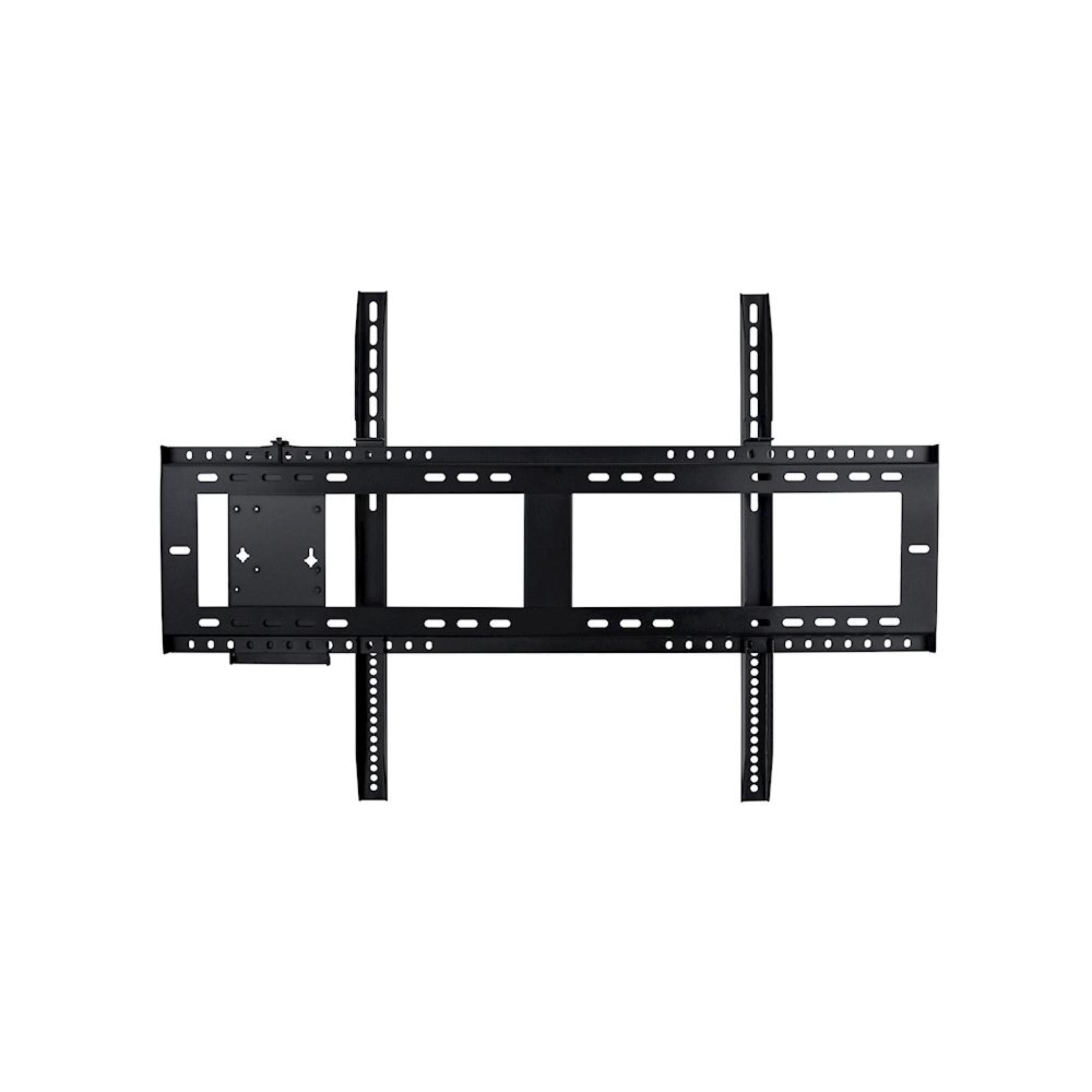
Optoma OWMFP05 Wall mount
Got Questions?
Email: support@simulatordirect.com
Phone: (714) 202-9416
Choose options
Fast & Free Shipping On Eligible Items
Exclusions Apply
Lowest Price Guarantee
Found a better price? We’ll match it — Guaranteed.
Simulator Expertise
Talk to a Real Expert
(714) 202-9416
Mon–Sat 8AM–5PM PST
- Description
- Product Features
- What's Included
- Product Specifications
- Product Installation Guide
- FAQ's
- Shipping/Returns & Warranty Policy
Optoma OWMFP05 Wall Mount for IFP Displays
The Optoma OWMFP05 is a durable wall mount solution designed specifically for Optoma’s 65", 75", and 86" interactive flat panel displays, making installation straightforward and secure. Its heavy-duty construction provides stable support for large displays and reliable long-term performance.
In addition to mounting the display, the OWMFP05 includes a VESA adapter plate that allows a small form factor (SFF) computer to be attached directly to the mount.
This helps streamline installations by consolidating hardware and minimizing clutter, making it ideal for conference rooms, classrooms, offices, and digital signage setups.
The mount is also compatible with the ST05 trolley, giving you added installation flexibility. You can secure your display to the wall or use the trolley for mobility when needed. Compact and robust, the OWMFP05 gives your installation a clean, professional look while supporting safe and secure display mounting.
Product Features
| Feature | Description |
|---|---|
| Wall Mount for Optoma IFP Displays | Designed for Optoma 65", 75", and 86" interactive flat panel displays. |
| Heavy-Duty Construction | Provides strong, stable, and reliable support for large-format displays. |
| VESA Adapter Plate Included | Allows a small form factor (SFF) computer to be mounted directly to the wall mount for a cleaner setup. |
| Compatible with ST05 Trolley | Offers flexible installation options between fixed wall mounting and mobile display use. |
| Compact Profile | Slim design helps minimize visual footprint when mounted. |
What’s Included
- OWMFP05 wall mount frame.
- VESA adapter plate for small form factor computer mounting.
- Mounting hardware, including screws, bolts, and anchors per the standard installation kit.
- Installation guide / quick-start manual.
Product Specifications
| Specification | Value |
|---|---|
| Compatible Display Sizes | 65", 75", and 86" interactive flat panel displays |
| Dimensions (W × D × H) | 37.8" × 25.59" × 1.81" |
| Net Weight | 13.23 lbs |
| Gross Weight | 14.11 lbs |
| Compatibility | Works with the ST05 trolley for mobility and supports small form factor PCs using the included VESA adapter plate. |
Product Installation Guide
- Unpack the OWMFP05 wall mount, VESA plate, mounting hardware, and instructions.
- Identify the mounting location on the wall. Make sure the wall surface is suitable for heavy loads, such as studs, concrete, or a reinforced wall.
- Attach the wall mount securely using the provided screws and anchors according to the installation guide.
- If required, attach the small form factor (SFF) computer to the VESA adapter plate before mounting the display.
- Mount the interactive flat panel display onto the wall mount, following VESA alignment and ensuring it is level and secure.
- If mobility is needed, the mount can also be used with the ST05 trolley for display relocation.
- Double-check stability and weight support before using the display for presentations, meetings, or interactive work.
Frequently Asked Questions
Q. Which display sizes are supported by the OWMFP05 mount? Click to expand ▼
A. The OWMFP05 supports Optoma interactive flat panel displays in 65", 75", and 86" sizes.
Q. Can I mount a computer along with the display? Click to expand ▼
A. Yes. The included VESA adapter plate allows you to mount a small form factor (SFF) computer directly to the wall mount.
Q. Is the mount compatible with a mobile stand? Click to expand ▼
A. Yes. The OWMFP05 is compatible with the ST05 trolley, allowing both fixed and mobile installation options.
Q. Does the package include the necessary mounting hardware? Click to expand ▼
A. Yes. Mounting hardware and installation instructions are included. The exact fasteners used may depend on your wall type and installation requirements.
Q. Will this wall mount safely support large interactive displays? Click to expand ▼
A. Yes. The OWMFP05 is built with heavy-duty construction to securely support 65"–86" displays when properly installed on a suitable wall surface.
Shipping / Returns & Warranty Policy: Optoma
Shipping Policy
Simulator Direct processes and ships Optoma orders using trusted parcel and freight carriers to help ensure reliable delivery and product protection. Most Optoma products ship directly from Optoma’s U.S. distribution partners.
Shipping Methods & Charges
- Optoma products typically ship via FedEx Ground within the contiguous United States.
- Larger displays or multi-unit orders may ship via freight carriers.
- All shipping costs, including any required signature fee, are calculated based on destination, order size, and shipping method.
- These charges are clearly displayed in your cart and at checkout before you place your order.
- From time to time, qualifying Optoma orders may be eligible for free standard ground shipping.
- This may apply to certain high-value orders or specific interactive/commercial display panels.
- When free shipping is available, it will be clearly indicated on the product page and/or at checkout.
- Unless Free Shipping is explicitly shown at checkout for your address, standard shipping rates apply.
- Free shipping, when offered, is limited to the contiguous United States.
- Free shipping does not apply to Alaska, Hawaii, U.S. territories, or international destinations.
Lead Time & Processing
- Most Optoma orders are released to the warehouse and prepared for shipment within 1–3 business days, subject to product availability and order volume.
- Once shipped, typical FedEx Ground transit times within the contiguous United States are approximately 3–5 business days.
- Freight shipments may take slightly longer.
- All delivery times are estimates only.
- Actual transit times may vary due to carrier routing, weather, seasonal volume, or other factors outside our control.
- Tracking details will be provided by email once your order has shipped so you can monitor its progress.
Freight Deliveries & Special Services
- Larger or heavier Optoma products may ship on pallets via freight carriers.
- Freight deliveries are typically made to a commercial loading dock or curbside at residential addresses.
- If you require services such as lift gate, inside delivery, or a scheduled appointment, please contact support@simulatordirect.com before placing your order.
- This allows us to provide a quote and set expectations for delivery.
Return Policy
We want you to be satisfied with your Optoma purchase. Because Optoma products are electronics covered by the manufacturer’s Limited Warranty, returns and exchanges are subject to specific guidelines.
Eligibility
- Returns must be requested within 30 days of delivery.
- Items must be unused, in their original packaging, and in resellable condition.
- All returns must receive written authorization from Simulator Direct before being shipped back.
- Unauthorized returns may be refused or subject to additional fees.
- For non-defective Optoma items, returns are generally limited to unopened, unused products in factory-sealed packaging.
- Open-box returns may not be accepted or may incur higher restocking fees, depending on inspection and manufacturer approval.
Return Shipping & Restocking
- Return shipping costs for non-defective Optoma products are the responsibility of the customer.
- Non-defective returns may be subject to restocking fees of up to 35% of the product price, depending on condition and manufacturer requirements.
- Any applicable restocking fee for an Optoma return will be disclosed at the time return authorization is granted.
- High-value orders are processed shortly after purchase.
- Cancellations must be requested promptly to help avoid processing fees.
Defective or Dead-on-Arrival Items
- If your Optoma product arrives defective, dead on arrival, or damaged in transit, please contact support@simulatordirect.com as soon as possible.
- Please report the issue ideally within 7 days of delivery.
- Include your order number and photos of the issue and packaging.
- We will assist with troubleshooting and coordinate next steps with Optoma.
- Approved defective or DOA units are generally repaired or replaced under Optoma’s Limited Warranty rather than refunded.
- Warranty shipping responsibilities and service options follow Optoma’s published warranty terms.
Non-Returnable Items
- Special-order Optoma configurations.
- Products identified as non-returnable on the product page.
- Items that have been installed, heavily used, or modified.
- Products that do not qualify for standard returns may only qualify for warranty service, repair, or replacement where applicable.
Return Process
- Email support@simulatordirect.com with your order number, a description of the issue, and photos if the item is damaged.
- Wait for written authorization and return instructions.
- If approved, ship the product using the provided instructions.
- Product must be packed in original or equivalent protective packaging.
- All accessories and documentation must be included.
- Once the item is received, inspected, and approved by the supplier or manufacturer, any applicable refund will be processed to the original payment method.
- Refund timing is typically within 7–20 business days, depending on manufacturer processing times.
Order Changes & Cancellations
- If you need to change or cancel an Optoma order, please contact support@simulatordirect.com as soon as possible.
- Orders that have not yet entered processing or shipment may be adjusted or cancelled at no charge.
- Once an order has been processed, allocated, or shipped, changes or cancellations are no longer guaranteed.
- If fulfilled, the order will be handled under the standard return policy.
- Special-order Optoma products may be subject to cancellation fees if cancelled after the supplier has reserved or shipped stock on your behalf.
- Any such fees will be disclosed before we finalize the cancellation.
Warranty & Replacements
Optoma Limited Warranty
Optoma products purchased through Simulator Direct are covered by Optoma’s official Limited Warranty for products sold in the United States and Canada. Warranty length and coverage vary by product category.
- Some projectors and displays may include different parts-and-labor and light-source coverage.
- For the exact warranty term that applies to your specific model, please refer to:
- The warranty card or documentation included with your product.
- The product page on Optoma’s website.
- Optoma’s Limited Warranty page at support.optomausa.com.
Warranty Service & Shipping
- If your Optoma product appears to be defective during the warranty period, contact Simulator Direct or Optoma End User Support to begin a warranty claim.
- Optoma will determine eligibility for repair, replacement, on-site service, or advanced replacement, as applicable under their policy.
- Once Optoma approves a warranty claim, they will issue return instructions and an RMA (Return Merchandise Authorization) if needed.
- Products returned under warranty must be properly packaged and include:
- All required accessories.
- All required documentation.
- Proof of purchase.
Optoma U.S. Warranty Shipping Terms
- For eligible warranty claims within 30 days of purchase, Optoma typically covers two-way shipping for warranty service.
- For eligible warranty claims after 30 days of purchase, Optoma typically covers one-way shipping, with the customer responsible for the other leg of transit.
- Any advanced replacement or expedited shipping options, when available, are offered at Optoma’s discretion and may be subject to additional terms or fees.
What the Warranty Covers
- During the applicable warranty period and under normal use, Optoma will, at its option, repair or replace products or components found to be defective in materials or workmanship.
- Replacement units or parts may be new, refurbished, or re-manufactured, consistent with Optoma’s standard practices.
The warranty does not cover:
- Normal wear and tear.
- Damage from misuse or improper installation.
- Cosmetic damage.
- Damage caused by non-Optoma accessories or modifications.
- Damage resulting from environmental conditions or power issues outside the specifications listed in the product documentation.
Post-Warranty Service
- If your Optoma product requires service after the warranty period expires, Optoma or its authorized service centers may offer paid repair options.
- In post-warranty cases, the customer is responsible for all parts, labor, and shipping costs.
- If you have questions about whether your issue is covered under warranty, or need help starting a claim, please contact support@simulatordirect.com.
- We will assist you in coordinating with Optoma Support.

Newsletter
Exclusive Updates. Delivered Before Anyone Else.