
Skip to content

Cart

Your cart is empty

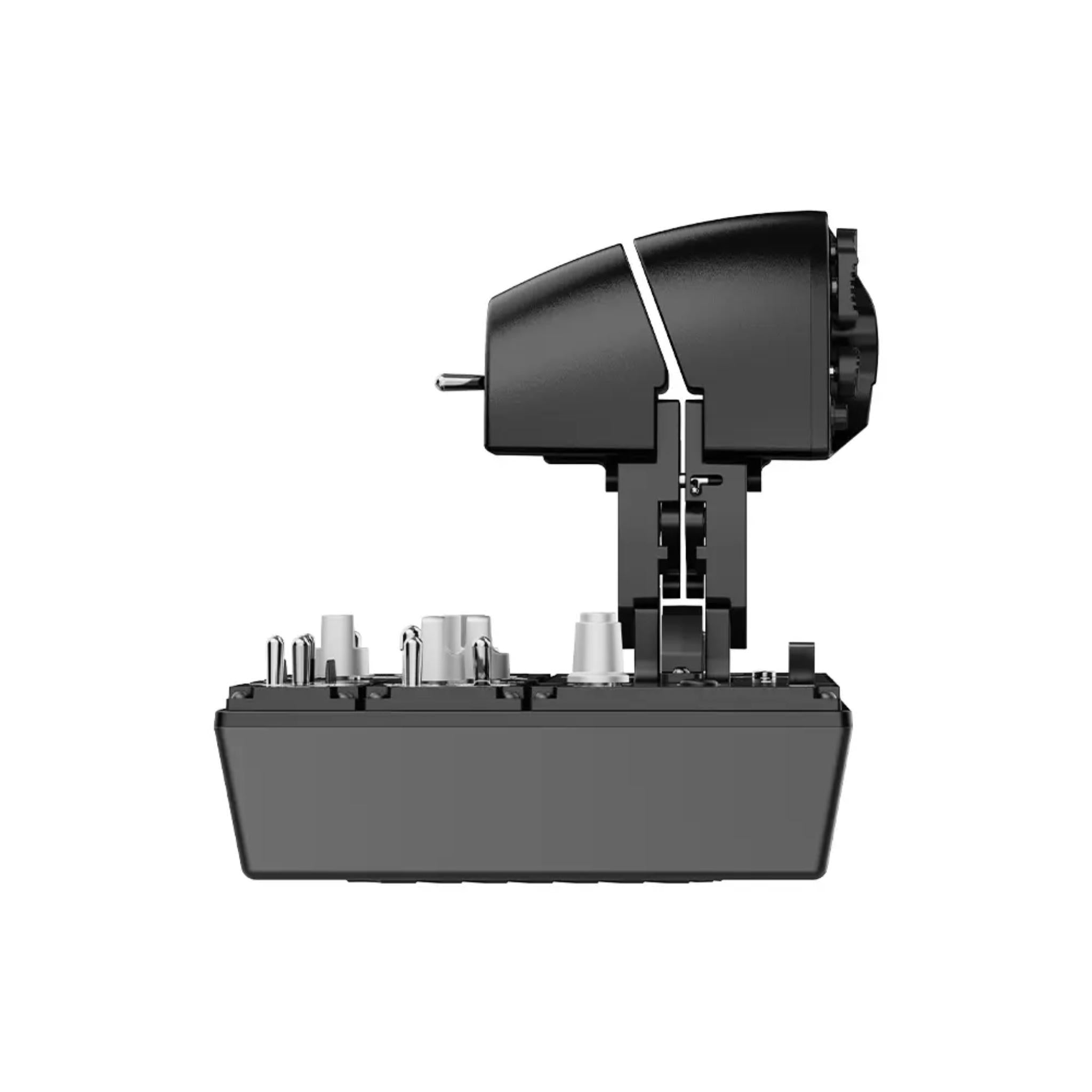
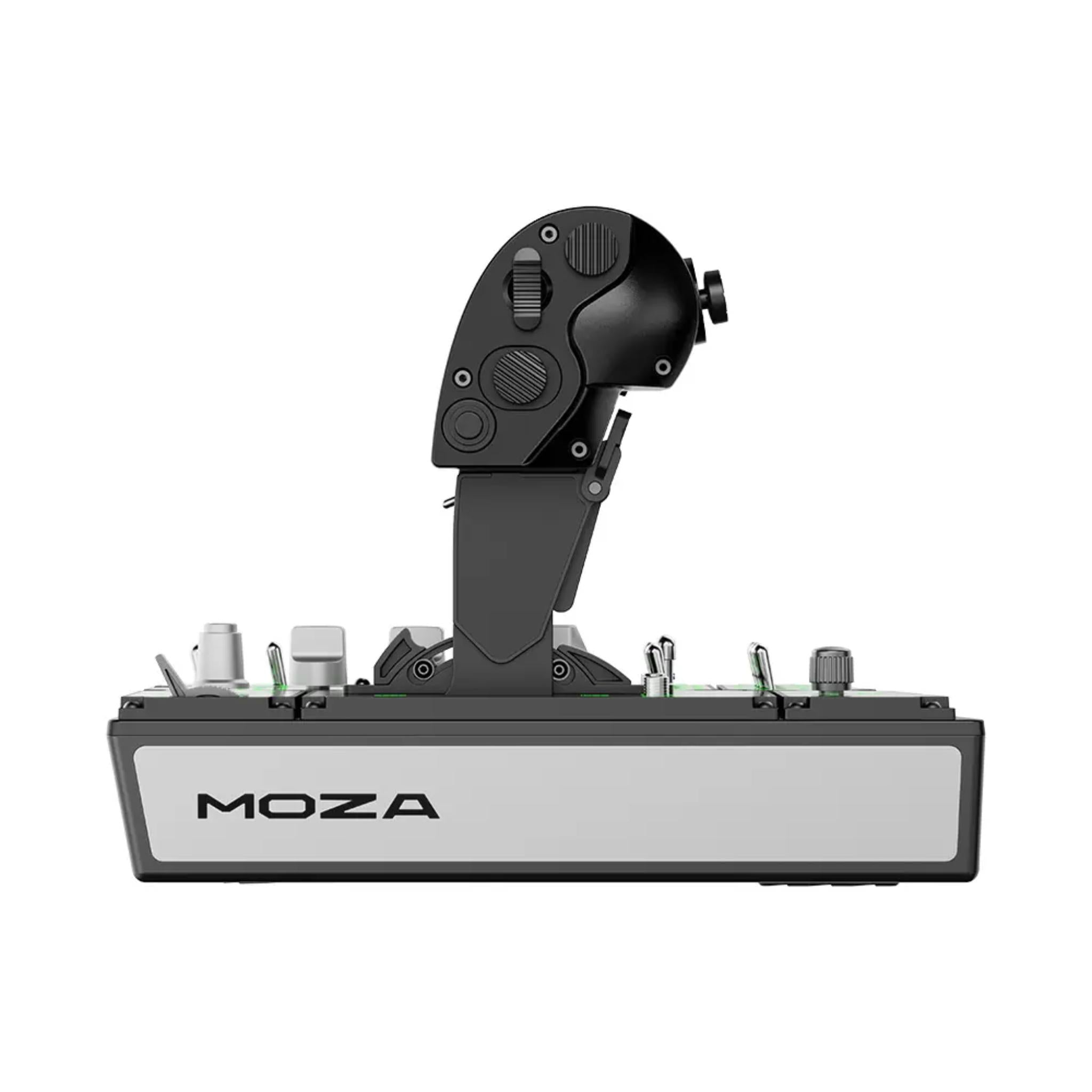
MOZA MTP Throttle Panel

Sale price$329.00

Got Questions?
Email: support@simulatordirect.com
Phone: (714) 202-9416

  • American Express
  • Apple Pay
  • Diners Club
  • Discover
  • Google Pay
  • Mastercard
  • PayPal
  • Shop Pay
  • Visa

Fast & Free Shipping On Eligible Items

Exclusions Apply

Lowest Price Guarantee

Found a better price? We’ll match it — Guaranteed.

Simulator Expertise

Talk to a Real Expert
(714) 202-9416
Mon–Sat 8AM–5PM PST

Description

MOZA MTP Throttle Panel

Take control of your flight simulation with the MOZA MTP Throttle, designed for professional and enthusiast pilots seeking precision, realism, and immersion.


Inspired by fighter jet throttle panels, the MTP features a CNC-machined aluminum alloy grip, 27 fully programmable switches, and an adjustable detent system to replicate real-world throttle milestones like afterburners and idle lockout.


Built-in vibration feedback delivers tactile cues for stalls, overspeed alerts, and combat impacts, while the Hall-effect joystick ensures smooth, drift-free input for both axis and buttons.


Fully customizable via MOZA Cockpit software, the MTP Throttle integrates seamlessly with the MTLP panel for a complete, two-handed fighter aircraft setup.


Plug-and-play compatible with PC, it provides professional-grade control without additional plugins. Perfect for sim pilots who demand uncompromising accuracy and realism.


Product Features

Product Features 


Feature

Details

Fighter-jet style throttle

Layout and ergonomics inspired by carrier-based fighter throttle panels for a highly immersive combat and modern jet experience.

Aluminum alloy grip

Throttle handle machined from aluminum alloy for a premium, durable feel and long-term reliability.

27 programmable switches

27 physical switches (toggles, buttons, rotaries, etc.) arranged for fast access to critical functions like gear, flaps, master arm, radar, and more.

Adjustable detent system

Customizable detents let you set positions for idle, cutoff, afterburner, or a center detent for space sims—tunable to your aircraft and preference.

15-bit magnetic encoder

High-resolution 15-bit encoder on the throttle axis for smooth, precise, and repeatable throttle inputs.

Hall-effect mini joystick

Integrated Hall-effect thumb joystick supports axis and button input; ideal for TDC, camera look, or fine ship control in space sims.

Telemetry vibration feedback

Built-in motor provides telemetry-driven vibration for stall, overspeed, weapons recoil, and other flight events—no extra plug-ins required.

Telemetry lighting effects

Backlighting and indicator LEDs can respond to sim telemetry for more informative, immersive night operations.

MOZA Cockpit configuration

Adjust detents, curves, vibration intensity, lighting modes, and button mappings in MOZA Cockpit software.

MTLP panel integration

Designed to pair cleanly with the MOZA MTLP Panel for a full two-handed fighter or carrier-ops cockpit setup.

PC-only USB device

Connects via USB and works on PC with top flight sims like MSFS 2020/2024, DCS, X-Plane, IL-2, and more.

Optional mounting hardware

Compatible with MOZA desktop clamp and mounting plate (sold separately) for stable use on desks or full cockpits.

What's Included

What’s Included


  • MOZA MTP Throttle × 1

  • Toolkit × 1 (wrench / basic tools)

  • User Manual × 1

  • Warranty Card × 1

  • Data Cable × 1


Product Specifications

Product Specifications


Core Specifications


Category

Spec

Product name

MOZA MTP Throttle

Product type

USB throttle panel for flight simulation (PC)

Dimensions (L × W × H)

277 × 194 × 216 mm

Weight

2.1 kg

Housing material

Composite material (main body)

Throttle grip material

Aluminum alloy

Physical switches

27

Hall joystick

Yes – Hall-effect mini joystick (axis + buttons)


Electronics & Telemetry


Category

Spec

Main axis sensor

15-bit magnetic encoder

Vibration telemetry

Supported (no plug-ins required)

Lighting telemetry

Supported (no plug-ins required)

Software

Configurable via MOZA Cockpit (Windows)

Platform support

PC (Windows)


Connectivity & Mounting


Category

Spec

Connection

USB (data cable included)

Standalone use

Yes – can be used alone on PC or as part of a MOZA setup

Desktop clamp

Optional accessory (sold separately)

Desktop mounting plate

Optional accessory (sold separately)


Getting Started Guide

Getting Started Guide


  1. Unbox and inspect the throttle


    • Remove the MTP Throttle, toolkit, data cable, and documentation from the box.

    • Check the levers, switches, and joystick for any visible damage or looseness.


  2. Plan your mounting method


    • Decide whether you’ll use a desktop clamp, a mounting plate, or install it directly on a cockpit panel.


  3. Position the throttle


    • Place the unit on the left or right side of your seat (typically left for modern fighter/airliner style), where your arm rests naturally.

    • Ensure the levers can travel fully without hitting your desk, monitor stand, or other controls.


  4. Secure the base (temporarily)


    • If you have a clamp or plate, loosely attach it so you can still fine-tune the angle and reach before fully tightening.


  5. Connect the USB cable


    • Plug the data cable into the throttle and then into a USB port on your PC.

    • Avoid unpowered hubs if possible for better stability.


  6. Power on your PC


    • Boot Windows and allow it to recognize the new USB device.


  7. Install MOZA Cockpit software


    • Download and install the latest MOZA Cockpit from MOZA’s website.

    • Open it and confirm that the MTP Throttle appears in the device list.


  8. Verify axes and buttons


    • In MOZA Cockpit, move the throttle levers, mini joystick, and operate each switch to ensure all 27 switch positions register correctly.


  9. Create a basic profile


    • Set a default detent layout (e.g., idle / MIL / afterburner) and moderate vibration/lighting levels.

    • Save this profile as your starting point (e.g., “Modern Fighter”).


  10. Bind controls in your flight sim


    • Launch MSFS, DCS, X-Plane, or IL-2 and map throttle axes and buttons to in-game functions.

    • Test in a quick mission or free flight and adjust as needed.


Product Installation Guide

Product Installation Guide


  1. Prepare your rig or desk


    • Make sure your desk or cockpit plate is rigid and free from flex.

    • Clear enough space to move the throttle levers from full idle to full power without obstruction.


  2. Install the clamp or mount (if used)


    • Attach the MOZA desktop clamp or mounting plate to the throttle using the supplied screws and wrench.

    • Position it on your desk edge or cockpit rail and lightly tighten so you can still make adjustments.


  3. Ergonomic alignment


    • Sit in your usual flying position and adjust distance, height, and angle so your wrist is relaxed and you can reach all switches easily.

    • Once comfortable, fully tighten the clamp or mounting bolts.


  4. Cable routing & strain relief


    • Route the USB cable along your rig frame or behind your desk to avoid snagging or pinching.

    • Use small cable clips or zip ties to secure it and reduce strain on the throttle’s connector.


  5. Optional: Pair with MTLP Panel


    • If you have a MOZA MTLP Panel, mount it adjacent to the MTP Throttle so both hands rest naturally on the controls.

    • Connect the panel via its own USB/RJ11 link following the MTLP instructions.


  6. Software setup and firmware check


    • Open MOZA Cockpit and ensure the MTP is detected.

    • Check for firmware updates for the throttle and apply them if available.


  7. Configure detents


    • In the software, set detent positions for your typical aircraft (e.g., idle, climb, afterburner).

    • For space sims, you might set a center detent so you can push/pull for forward/reverse thrust.


  8. Tune vibration and lighting


    • Adjust vibration intensity so you can clearly feel alerts without it becoming distracting.

    • Set lighting brightness and telemetry behaviors (e.g., change color on gear down or afterburner).


  9. Profile creation for multiple sims


    • Create separate profiles for different sims or aircraft types (e.g., “DCS Hornet,” “MSFS Airliner,” “Space Sim”).

    • Map switches logically—group COM/NAV, weapons, views, and systems in a consistent pattern.


  10. Final verification flight


    • Run a test flight or mission and confirm that detents, vibration, and lighting all trigger as expected.

    • After a few sessions, re-check your clamp or mounting bolts and tighten if any play develops.


Videos


Product Manual and User Guides


FAQ's

Frequently Asked Questions 


Q: What games is the MTP Throttle compatible with?

A: The MTP is designed for PC flight simulators and works with major titles like Microsoft Flight Simulator 2020/2024, DCS World, X-Plane 11/12, IL-2 and others via MOZA Cockpit. Because it’s a standard USB device, you simply map axes and buttons inside each sim.


Q: How many buttons and switches does the throttle have?

A: The MTP includes 27 physical switches, organized into toggles, pushbuttons, rotaries, and a mini-joystick, giving you plenty of inputs for complex modern aircraft and space sims.


Q: Does the MTP Throttle support adjustable detents?

A: Yes. The adjustable detent system lets you set custom positions for idle, afterburner, reverse, or a center detent. This is especially useful for jets and space games where you need to feel specific throttle points without looking down.


Q: What kind of sensors does it use for accuracy?

A: The main throttle axis uses a 15-bit magnetic encoder, and the mini joystick uses Hall-effect sensors. Both are contactless designs, which means smooth, precise input and no traditional potentiometer wear or drift.


Q: Does it have force feedback or vibration?

A: The throttle doesn’t provide traditional “force feedback” on the lever, but it does feature built-in vibration that responds to sim telemetry—such as stall warnings, overspeed, or weapons events—and can be tuned in MOZA Cockpit.


Q: Can I use the MTP without other MOZA hardware?

A: Yes. The MTP can run standalone as a USB throttle on PC. You don’t need a MOZA base or pedals to use it, though it integrates neatly with other MOZA flight products if you decide to build out a full ecosystem.


Q: How does the MTP work with the MTLP Panel?

A: The MTP is designed to pair with the MOZA MTLP Panel to create a complete fighter-style left-hand stack: the MTP handles throttle and thumb controls, while the MTLP adds landing gear, brakes, and additional switches. Mounted together, they form a cohesive, two-handed cockpit layout.

Shipping/Returns & Warranty Policy

Shipping Policy

Simulator Direct fulfills MOZA Racing products through authorized ASI distribution warehouses located throughout the United States. Orders ship directly from ASI’s facilities using trusted freight and parcel carriers to help ensure secure delivery and product protection.

Because MOZA Racing products are typically large, heavy, or freight-class items, shipping methods and timelines may differ from standard parcel shipments.

Shipping Methods & Charges

  • ASI Partner products generally ship via freight carriers.
  • Select smaller items may ship via standard parcel services when applicable.
  • Shipping method and cost may vary based on product size, product weight, destination, and available carrier options.
  • Any applicable shipping charges will be displayed at checkout or confirmed before order fulfillment when required.

Processing Time & Order Handling

  • Most ASI Partner orders ship same business day or next business day, depending on inventory location and order cutoff time.
  • General warehouse cutoff times:
    • East Coast warehouses: Orders placed before 2:00 PM PST may ship same day.
    • Los Angeles warehouse: Orders placed before 12:00 PM PST may ship same day.
    • Other U.S. warehouses: Orders placed before 4:00 PM PST may ship same day.
  • Orders not shipped the same day will typically ship the next business day.
  • ASI Partner warehouses operate Monday–Friday and are closed on weekends and major holidays.

Inventory Availability & Backorders

Inventory availability is maintained through ASI Partner’s distribution network and may vary by warehouse.

  • Inventory data is accessible through ASI systems, but it is not live and typically updates once per day.
  • An item may appear available but sell out before an order is processed.
  • Simulator Direct may confirm availability manually before finalizing an order when necessary.

If an item becomes unavailable after order placement:

  • Simulator Direct will notify the customer.
  • Options may include holding the order, partial shipment if supported, or cancellation with refund.
  • Estimated restock timelines will be communicated when available.

Tracking & Delivery

  • Tracking information will be provided by email once your order ships.
  • Freight deliveries are typically curbside delivery unless otherwise arranged.
  • If special delivery services are required, please contact support@simulatordirect.com before placing the order.
    • Examples may include lift gate service, inside delivery, or scheduled delivery appointment.
    • Availability and added costs must be confirmed before fulfillment.

Return Policy

Returns for ASI Partner-fulfilled products follow ASI Partner’s official return policy.

Because ASI Partner operates as a distribution provider rather than a retail storefront, return eligibility, restocking fees, and return shipping costs may vary by product and circumstance.

Return Authorization & Conditions

  • All returns require prior written authorization from Simulator Direct.
  • Unauthorized returns may be refused or returned to the sender.
  • Items must be returned in original packaging, unused, and in resalable condition unless otherwise approved.
  • Certain items may be non-returnable due to size, customization, or manufacturer restrictions.
  • Special return approvals may be granted on a case-by-case basis and are subject to ASI Partner’s acceptance.

Return Shipping & Fees

  • Customers are responsible for all return shipping costs unless the return is due to an error or defect.
  • Original shipping charges are non-refundable.
  • Restocking fees may apply per ASI Partner’s return policy.
  • Carrier fees associated with refused deliveries, storage, or re-routing may be deducted from the refund.
  • Refunds are issued only after ASI Partner receives, inspects, and approves the returned item.

Damaged or Incorrect Items

If your order arrives damaged or incorrect:

  • Contact support@simulatordirect.com promptly.
  • Provide your order number, photos of the damage or issue, and a description.
  • Simulator Direct will coordinate directly with ASI Partner to resolve the issue in accordance with their policies.

Order Changes & Cancellations

Orders are processed quickly once submitted.

  • Orders not yet shipped may be eligible for cancellation or modification.
  • Orders that have shipped or entered fulfillment may be subject to return policies and applicable fees.
  • Late-stage cancellations may incur shipping or handling charges.
  • Please contact support immediately if changes are needed.

Questions or Assistance

For any ASI Partner-related shipping, returns, or order questions, contact:

support@simulatordirect.com

We will coordinate directly with ASI Partner on your behalf to help ensure a smooth experience.

Description

MOZA MTP Throttle Panel

Take control of your flight simulation with the MOZA MTP Throttle, designed for professional and enthusiast pilots seeking precision, realism, and immersion.


Inspired by fighter jet throttle panels, the MTP features a CNC-machined aluminum alloy grip, 27 fully programmable switches, and an adjustable detent system to replicate real-world throttle milestones like afterburners and idle lockout.


Built-in vibration feedback delivers tactile cues for stalls, overspeed alerts, and combat impacts, while the Hall-effect joystick ensures smooth, drift-free input for both axis and buttons.


Fully customizable via MOZA Cockpit software, the MTP Throttle integrates seamlessly with the MTLP panel for a complete, two-handed fighter aircraft setup.


Plug-and-play compatible with PC, it provides professional-grade control without additional plugins. Perfect for sim pilots who demand uncompromising accuracy and realism.


Product Features

Product Features 


Feature

Details

Fighter-jet style throttle

Layout and ergonomics inspired by carrier-based fighter throttle panels for a highly immersive combat and modern jet experience.

Aluminum alloy grip

Throttle handle machined from aluminum alloy for a premium, durable feel and long-term reliability.

27 programmable switches

27 physical switches (toggles, buttons, rotaries, etc.) arranged for fast access to critical functions like gear, flaps, master arm, radar, and more.

Adjustable detent system

Customizable detents let you set positions for idle, cutoff, afterburner, or a center detent for space sims—tunable to your aircraft and preference.

15-bit magnetic encoder

High-resolution 15-bit encoder on the throttle axis for smooth, precise, and repeatable throttle inputs.

Hall-effect mini joystick

Integrated Hall-effect thumb joystick supports axis and button input; ideal for TDC, camera look, or fine ship control in space sims.

Telemetry vibration feedback

Built-in motor provides telemetry-driven vibration for stall, overspeed, weapons recoil, and other flight events—no extra plug-ins required.

Telemetry lighting effects

Backlighting and indicator LEDs can respond to sim telemetry for more informative, immersive night operations.

MOZA Cockpit configuration

Adjust detents, curves, vibration intensity, lighting modes, and button mappings in MOZA Cockpit software.

MTLP panel integration

Designed to pair cleanly with the MOZA MTLP Panel for a full two-handed fighter or carrier-ops cockpit setup.

PC-only USB device

Connects via USB and works on PC with top flight sims like MSFS 2020/2024, DCS, X-Plane, IL-2, and more.

Optional mounting hardware

Compatible with MOZA desktop clamp and mounting plate (sold separately) for stable use on desks or full cockpits.

What's Included

What’s Included


  • MOZA MTP Throttle × 1

  • Toolkit × 1 (wrench / basic tools)

  • User Manual × 1

  • Warranty Card × 1

  • Data Cable × 1


Product Specifications

Product Specifications


Core Specifications


Category

Spec

Product name

MOZA MTP Throttle

Product type

USB throttle panel for flight simulation (PC)

Dimensions (L × W × H)

277 × 194 × 216 mm

Weight

2.1 kg

Housing material

Composite material (main body)

Throttle grip material

Aluminum alloy

Physical switches

27

Hall joystick

Yes – Hall-effect mini joystick (axis + buttons)


Electronics & Telemetry


Category

Spec

Main axis sensor

15-bit magnetic encoder

Vibration telemetry

Supported (no plug-ins required)

Lighting telemetry

Supported (no plug-ins required)

Software

Configurable via MOZA Cockpit (Windows)

Platform support

PC (Windows)


Connectivity & Mounting


Category

Spec

Connection

USB (data cable included)

Standalone use

Yes – can be used alone on PC or as part of a MOZA setup

Desktop clamp

Optional accessory (sold separately)

Desktop mounting plate

Optional accessory (sold separately)


Getting Started Guide

Getting Started Guide


  1. Unbox and inspect the throttle


    • Remove the MTP Throttle, toolkit, data cable, and documentation from the box.

    • Check the levers, switches, and joystick for any visible damage or looseness.


  2. Plan your mounting method


    • Decide whether you’ll use a desktop clamp, a mounting plate, or install it directly on a cockpit panel.


  3. Position the throttle


    • Place the unit on the left or right side of your seat (typically left for modern fighter/airliner style), where your arm rests naturally.

    • Ensure the levers can travel fully without hitting your desk, monitor stand, or other controls.


  4. Secure the base (temporarily)


    • If you have a clamp or plate, loosely attach it so you can still fine-tune the angle and reach before fully tightening.


  5. Connect the USB cable


    • Plug the data cable into the throttle and then into a USB port on your PC.

    • Avoid unpowered hubs if possible for better stability.


  6. Power on your PC


    • Boot Windows and allow it to recognize the new USB device.


  7. Install MOZA Cockpit software


    • Download and install the latest MOZA Cockpit from MOZA’s website.

    • Open it and confirm that the MTP Throttle appears in the device list.


  8. Verify axes and buttons


    • In MOZA Cockpit, move the throttle levers, mini joystick, and operate each switch to ensure all 27 switch positions register correctly.


  9. Create a basic profile


    • Set a default detent layout (e.g., idle / MIL / afterburner) and moderate vibration/lighting levels.

    • Save this profile as your starting point (e.g., “Modern Fighter”).


  10. Bind controls in your flight sim


    • Launch MSFS, DCS, X-Plane, or IL-2 and map throttle axes and buttons to in-game functions.

    • Test in a quick mission or free flight and adjust as needed.


Product Installation Guide

Product Installation Guide


  1. Prepare your rig or desk


    • Make sure your desk or cockpit plate is rigid and free from flex.

    • Clear enough space to move the throttle levers from full idle to full power without obstruction.


  2. Install the clamp or mount (if used)


    • Attach the MOZA desktop clamp or mounting plate to the throttle using the supplied screws and wrench.

    • Position it on your desk edge or cockpit rail and lightly tighten so you can still make adjustments.


  3. Ergonomic alignment


    • Sit in your usual flying position and adjust distance, height, and angle so your wrist is relaxed and you can reach all switches easily.

    • Once comfortable, fully tighten the clamp or mounting bolts.


  4. Cable routing & strain relief


    • Route the USB cable along your rig frame or behind your desk to avoid snagging or pinching.

    • Use small cable clips or zip ties to secure it and reduce strain on the throttle’s connector.


  5. Optional: Pair with MTLP Panel


    • If you have a MOZA MTLP Panel, mount it adjacent to the MTP Throttle so both hands rest naturally on the controls.

    • Connect the panel via its own USB/RJ11 link following the MTLP instructions.


  6. Software setup and firmware check


    • Open MOZA Cockpit and ensure the MTP is detected.

    • Check for firmware updates for the throttle and apply them if available.


  7. Configure detents


    • In the software, set detent positions for your typical aircraft (e.g., idle, climb, afterburner).

    • For space sims, you might set a center detent so you can push/pull for forward/reverse thrust.


  8. Tune vibration and lighting


    • Adjust vibration intensity so you can clearly feel alerts without it becoming distracting.

    • Set lighting brightness and telemetry behaviors (e.g., change color on gear down or afterburner).


  9. Profile creation for multiple sims


    • Create separate profiles for different sims or aircraft types (e.g., “DCS Hornet,” “MSFS Airliner,” “Space Sim”).

    • Map switches logically—group COM/NAV, weapons, views, and systems in a consistent pattern.


  10. Final verification flight


    • Run a test flight or mission and confirm that detents, vibration, and lighting all trigger as expected.

    • After a few sessions, re-check your clamp or mounting bolts and tighten if any play develops.


Videos


Product Manual and User Guides


FAQ's

Frequently Asked Questions 


Q: What games is the MTP Throttle compatible with?

A: The MTP is designed for PC flight simulators and works with major titles like Microsoft Flight Simulator 2020/2024, DCS World, X-Plane 11/12, IL-2 and others via MOZA Cockpit. Because it’s a standard USB device, you simply map axes and buttons inside each sim.


Q: How many buttons and switches does the throttle have?

A: The MTP includes 27 physical switches, organized into toggles, pushbuttons, rotaries, and a mini-joystick, giving you plenty of inputs for complex modern aircraft and space sims.


Q: Does the MTP Throttle support adjustable detents?

A: Yes. The adjustable detent system lets you set custom positions for idle, afterburner, reverse, or a center detent. This is especially useful for jets and space games where you need to feel specific throttle points without looking down.


Q: What kind of sensors does it use for accuracy?

A: The main throttle axis uses a 15-bit magnetic encoder, and the mini joystick uses Hall-effect sensors. Both are contactless designs, which means smooth, precise input and no traditional potentiometer wear or drift.


Q: Does it have force feedback or vibration?

A: The throttle doesn’t provide traditional “force feedback” on the lever, but it does feature built-in vibration that responds to sim telemetry—such as stall warnings, overspeed, or weapons events—and can be tuned in MOZA Cockpit.


Q: Can I use the MTP without other MOZA hardware?

A: Yes. The MTP can run standalone as a USB throttle on PC. You don’t need a MOZA base or pedals to use it, though it integrates neatly with other MOZA flight products if you decide to build out a full ecosystem.


Q: How does the MTP work with the MTLP Panel?

A: The MTP is designed to pair with the MOZA MTLP Panel to create a complete fighter-style left-hand stack: the MTP handles throttle and thumb controls, while the MTLP adds landing gear, brakes, and additional switches. Mounted together, they form a cohesive, two-handed cockpit layout.

Shipping/Returns & Warranty Policy

Shipping Policy

Simulator Direct fulfills MOZA Racing products through authorized ASI distribution warehouses located throughout the United States. Orders ship directly from ASI’s facilities using trusted freight and parcel carriers to help ensure secure delivery and product protection.

Because MOZA Racing products are typically large, heavy, or freight-class items, shipping methods and timelines may differ from standard parcel shipments.

Shipping Methods & Charges

  • ASI Partner products generally ship via freight carriers.
  • Select smaller items may ship via standard parcel services when applicable.
  • Shipping method and cost may vary based on product size, product weight, destination, and available carrier options.
  • Any applicable shipping charges will be displayed at checkout or confirmed before order fulfillment when required.

Processing Time & Order Handling

  • Most ASI Partner orders ship same business day or next business day, depending on inventory location and order cutoff time.
  • General warehouse cutoff times:
    • East Coast warehouses: Orders placed before 2:00 PM PST may ship same day.
    • Los Angeles warehouse: Orders placed before 12:00 PM PST may ship same day.
    • Other U.S. warehouses: Orders placed before 4:00 PM PST may ship same day.
  • Orders not shipped the same day will typically ship the next business day.
  • ASI Partner warehouses operate Monday–Friday and are closed on weekends and major holidays.

Inventory Availability & Backorders

Inventory availability is maintained through ASI Partner’s distribution network and may vary by warehouse.

  • Inventory data is accessible through ASI systems, but it is not live and typically updates once per day.
  • An item may appear available but sell out before an order is processed.
  • Simulator Direct may confirm availability manually before finalizing an order when necessary.

If an item becomes unavailable after order placement:

  • Simulator Direct will notify the customer.
  • Options may include holding the order, partial shipment if supported, or cancellation with refund.
  • Estimated restock timelines will be communicated when available.

Tracking & Delivery

  • Tracking information will be provided by email once your order ships.
  • Freight deliveries are typically curbside delivery unless otherwise arranged.
  • If special delivery services are required, please contact support@simulatordirect.com before placing the order.
    • Examples may include lift gate service, inside delivery, or scheduled delivery appointment.
    • Availability and added costs must be confirmed before fulfillment.

Return Policy

Returns for ASI Partner-fulfilled products follow ASI Partner’s official return policy.

Because ASI Partner operates as a distribution provider rather than a retail storefront, return eligibility, restocking fees, and return shipping costs may vary by product and circumstance.

Return Authorization & Conditions

  • All returns require prior written authorization from Simulator Direct.
  • Unauthorized returns may be refused or returned to the sender.
  • Items must be returned in original packaging, unused, and in resalable condition unless otherwise approved.
  • Certain items may be non-returnable due to size, customization, or manufacturer restrictions.
  • Special return approvals may be granted on a case-by-case basis and are subject to ASI Partner’s acceptance.

Return Shipping & Fees

  • Customers are responsible for all return shipping costs unless the return is due to an error or defect.
  • Original shipping charges are non-refundable.
  • Restocking fees may apply per ASI Partner’s return policy.
  • Carrier fees associated with refused deliveries, storage, or re-routing may be deducted from the refund.
  • Refunds are issued only after ASI Partner receives, inspects, and approves the returned item.

Damaged or Incorrect Items

If your order arrives damaged or incorrect:

  • Contact support@simulatordirect.com promptly.
  • Provide your order number, photos of the damage or issue, and a description.
  • Simulator Direct will coordinate directly with ASI Partner to resolve the issue in accordance with their policies.

Order Changes & Cancellations

Orders are processed quickly once submitted.

  • Orders not yet shipped may be eligible for cancellation or modification.
  • Orders that have shipped or entered fulfillment may be subject to return policies and applicable fees.
  • Late-stage cancellations may incur shipping or handling charges.
  • Please contact support immediately if changes are needed.

Questions or Assistance

For any ASI Partner-related shipping, returns, or order questions, contact:

support@simulatordirect.com

We will coordinate directly with ASI Partner on your behalf to help ensure a smooth experience.