


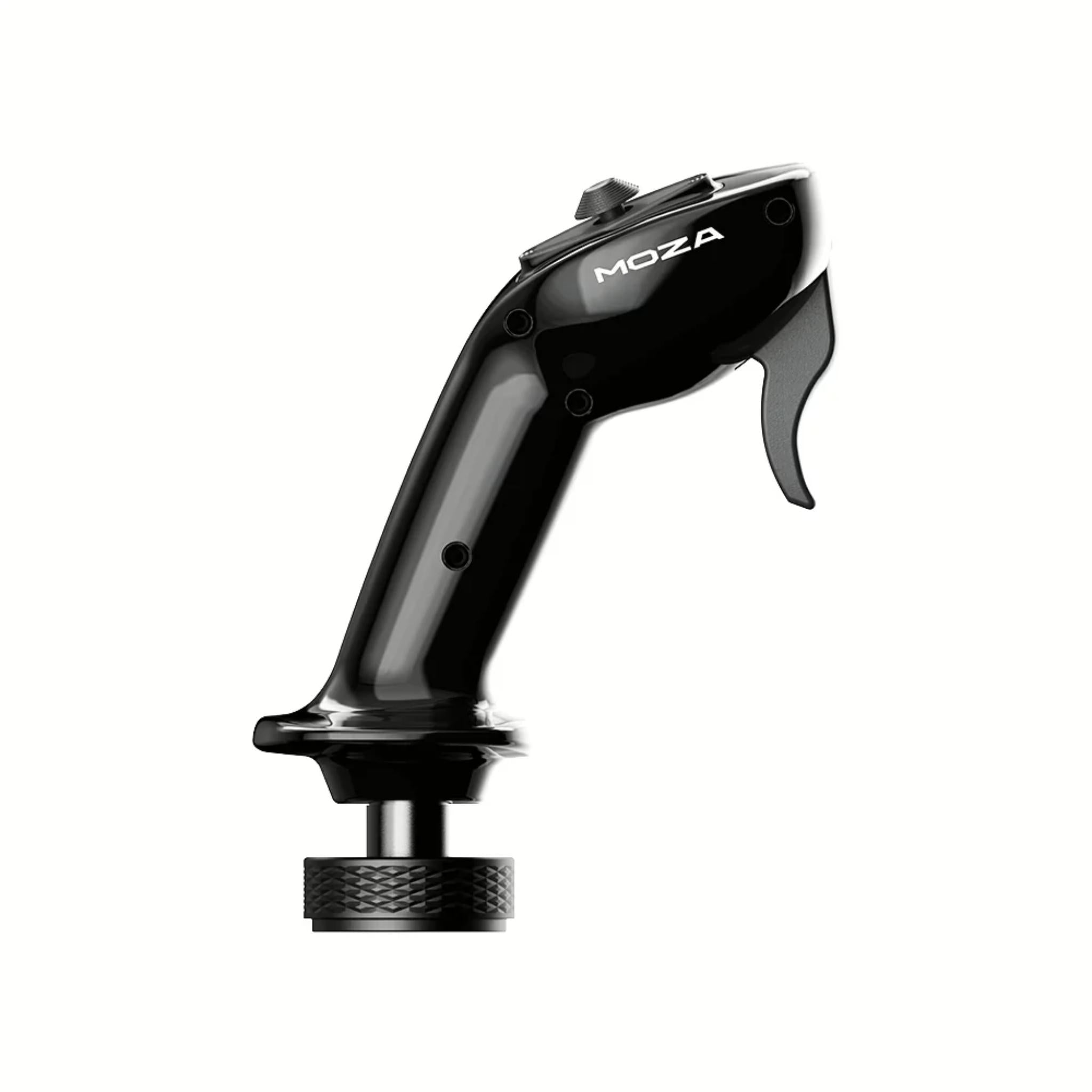
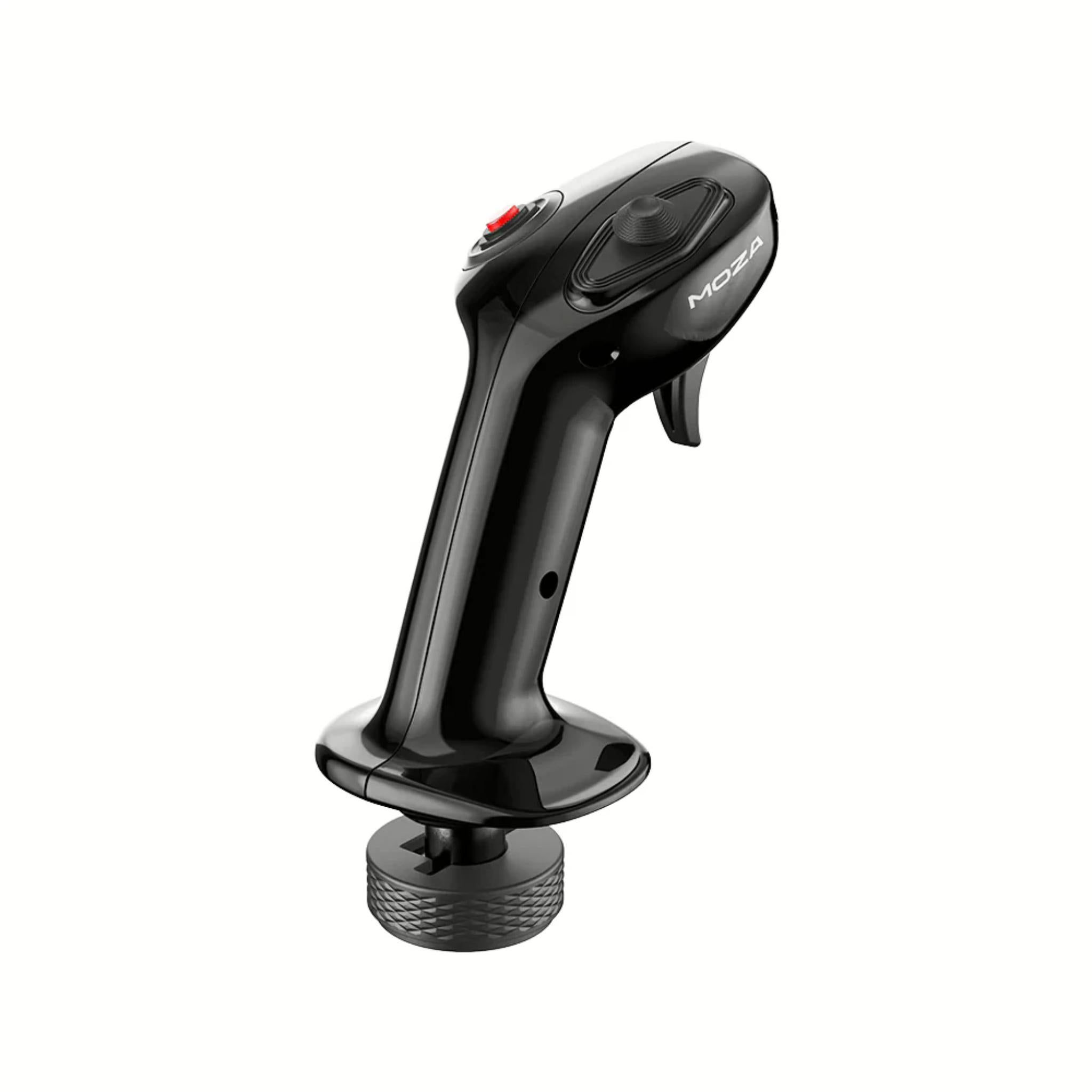
MOZA MA3X Flightstick
Got Questions?
Email: support@simulatordirect.com
Phone: (714) 202-9416
Choose options
- Description
- Product Features
- What's Included
- Product Specifications
- Getting Started Guide
- Product Installation Guide
- FAQ's
- Shipping/Returns & Warranty Policy
MOZA MA3X Flightstick
Enhance your flight simulation with the MOZA MA3X Side Stick, designed for pilots seeking precision, realism, and durability.

Inspired by real aircraft controls, the MA3X features a classic ergonomic design with a tactile, resin-like surface for an authentic hand feel.

Constructed from ultra-rigid composite materials, it can withstand up to 30 kg of force, ensuring long-term reliability even under intense use.


Equipped with premium ALPS switches, it provides 12 programmable input signals, including a trigger, toggle switch, and 8-way hat switch for full control over your aircraft.

Plug-and-play compatible with all MOZA bases and most third-party bases via a standard 5-pin aviation connector, the MA3X integrates seamlessly into your existing setup.

Perfect for sim pilots who demand immersive, responsive, and professional-grade flight controls.
Product Features
|
Feature |
Details |
|---|---|
|
Realistic sidestick form factor |
Side-stick style grip inspired by modern commercial and fly-by-wire aircraft controls for an authentic feel. |
|
Ultra-rigid composite shell |
Main casing built from high-strength composite material: lightweight yet rated to withstand up to 30 kg of load. |
|
Durable ALPS switches |
Uses ALPS-brand switches for crisp clicks and long service life (tested for ~100,000 cycles). |
|
Enhanced button layout |
4 physical buttons and controls expanded to up to 12 distinct input signals for core flight functions on the grip. |
|
Integrated 8-way hat |
One 8-way hat switch for trim, view control, or avionics navigation. |
|
Front trigger & toggle |
Dedicated trigger and toggle switch for critical actions like PTT, weapon release, AP disconnect, etc. |
|
Tactile aircraft-like finish |
Multi-layer coating and UV treatment give a smooth, “cockpit-grade” surface that feels similar to aircraft resin controls. |
|
Broad base compatibility |
Standard 5-pin aviation connector, compatible with all MOZA bases and most third-party bases (electrical match required). |
|
Lightweight for long sessions |
Approx. 220 g weight keeps arm fatigue low while maintaining a solid, premium feel. |
|
Designed for demanding use |
Composite shell + tested switches give robust performance for high-intensity flying and frequent use. |
|
Plug-and-play with MOZA |
Simple plug-in operation when used with MOZA flight bases; controls are recognized and mapped via MOZA software. |
What’s Included
-
MOZA MA3X Side Stick × 1
-
Toolkit × 1 (basic wrenches / screws for mounting and adjustments)
-
User documentation / quick guide × 1
Product Specifications
Core Specs
|
Category |
Spec |
|---|---|
|
Product name |
MOZA MA3X Side Stick |
|
Product type |
Flight sidestick (grip only) |
|
Casing material |
Composite (ultra-rigid housing) |
|
Switch material |
ABS |
|
Primary switches |
ALPS switches, 100k+ actuation life |
|
Input signals |
Up to 12 distinct input signals (4 physical buttons + trigger, toggle, 8-way hat, etc.) |
Controls
|
Category |
Spec |
|---|---|
|
8-way switch |
1 × 8-way hat switch |
|
Trigger |
1 × front trigger |
|
Toggle switch |
1 × toggle switch |
|
Buttons |
Additional face/thumb buttons (total 4 physical buttons; expanded to 12 signals) |
Electrical & Interface
|
Category |
Spec |
|---|---|
|
Input voltage |
3.3 V |
|
Input current |
5 A |
|
Connector type |
Standard 5-pin aviation connector |
|
Compatibility |
All MOZA flight bases and most third-party bases (with matching electrical interface) |
Physical
|
Category |
Spec |
|---|---|
|
Weight |
~220 g |
|
Dimensions (W × H × D) |
Approx. 99 × 213.5 × 132 mm |
|
Color |
Black |
Getting Started Guide
-
Unbox and inspect
-
Take the MA3X, toolkit, and paperwork out of the box.
-
Check the grip, connector, and buttons for any visible damage before installation.
-
-
Power off your base
-
Make sure your flight base (e.g., MOZA AB9 or compatible third-party base) is fully powered down and secured to your rig or desk.
-
-
Locate the grip connector
-
On the MA3X, gently pull out the 5-pin aviation connector cable from the bottom of the grip.
-
-
Align and plug in
-
Match the alignment mark on the 5-pin plug with the socket on your base.
-
Push the connector straight in until fully seated.
-
-
Secure the grip
-
Slide the stick onto the base shaft (if applicable) and tighten the locking collar or nut ring using the included wrench so the grip does not rotate or wobble during use. (Follow the specific instructions for your base.)
-
-
Check button travel
-
Click each button, pull the trigger, move the toggle, and actuate the hat switch to ensure everything feels normal and returns cleanly.
-
-
Power on and install software
-
Turn on your base and PC.
-
Install or open MOZA Cockpit (or your base’s configuration software) so the grip can be detected.
-
-
Verify inputs
-
In the software’s device test page, press each button and move the hat to confirm all 12 input signals register correctly.
-
-
Bind in your sim
-
Open MSFS, X-Plane, DCS, or your preferred sim and bind the new inputs to trims, views, AP modes, radios, or weapon systems as desired.
-
Product Installation Guide
-
Review safety and compatibility
-
Confirm your base supports 5-pin aviation connectors and is rated to work with MA3X-style grips.
-
Avoid installing near moisture, direct heat, or where cables can be crushed.
-
-
Secure your base first
-
Make sure your flight base is properly clamped or hard-mounted to your cockpit/desk so it won’t move when you apply force to the grip.
-
-
Prepare the connector
-
Carefully pull the MA3X’s cable from the grip without bending the pins.
-
Inspect the 5-pin connector to make sure there is no debris or bent pins.
-
-
Connect to the base
-
Align the index mark and insert the connector into the base’s socket.
-
If the base uses a locking collar, tighten it until snug to prevent accidental disconnection.
-
-
Lock the grip mechanically
-
Slide the stick onto the base’s shaft/QR interface (if required).
-
Use the supplied wrenches and screws to secure it, following the base manufacturer’s guide.
-
-
Cable management
-
Route the short grip cable so it does not rub against the base housing or get pinched by your knees.
-
Use small zip ties or clips on your rig to keep everything neat and strain-relieved.
-
-
Connect other peripherals
-
Attach your throttle, rudder pedals, and any panels to the PC or base hub, making sure cable runs don’t interfere with the sidestick.
-
-
Install / update configuration software
-
Install the latest version of MOZA Cockpit (for MOZA bases) or your base’s configuration tool.
-
Check for firmware updates for the base itself before heavy use.
-
-
Input test & mapping
-
Use the software’s input test screen to verify each MA3X button, trigger, toggle, and hat direction.
-
Create a profile for your primary aircraft (e.g., A320, F-16, GA side-stick) and map controls logically.
-
-
Sim-side fine-tuning
-
In your sim, clear any conflicting default bindings and set up the MA3X layout to match your MOZA profile.
-
Run a short flight and verify that crucial functions (trim, AP disconnect, view control, brakes, etc.) feel intuitive.
-
-
Periodic checks
-
After your first few sessions, re-check the mounting screws and connector collar.
-
If you notice missed button presses, re-test in the device software and inspect the grip cable and connector.
-
Frequently Asked Questions
Q: How many inputs does the MA3X Side Stick provide?
A: The MA3X offers up to 12 programmable input signals, including an 8-way hat, trigger, toggle, and multiple buttons. This is plenty for primary flight functions, views, trim, and a few custom commands in modern sims.
Q: What materials is the sidestick made from?
A: The main casing is made from an ultra-rigid composite material, with ABS switch components and a coated surface that mimics the feel of aircraft resin controls. This combo keeps it lightweight but strong enough to handle loads up to 30 kg.
Q: Is the MA3X compatible with non-MOZA bases?
A: Yes. The MA3X uses a standard 5-pin aviation connector and is advertised as compatible with all MOZA bases and most third-party bases. For non-MOZA hardware, you’ll just want to confirm that the pinout and mechanical mount match your base or that an adapter is available.
Q: What kind of switches are used inside the stick?
A: MOZA uses ALPS switches for the primary controls. These are known for precise actuation and long life; on the MA3X, they’re tested for roughly 100,000 cycles per switch under lab conditions.
Q: Is the MA3X plug-and-play on PC?
A: When paired with a MOZA flight base, the MA3X is effectively plug-and-play: attach the grip, open MOZA Cockpit, and your inputs will appear for mapping. With third-party bases, you may need to do the usual button mapping inside your simulator, but no extra drivers are typically required beyond the base’s own software.
Q: How heavy is the sidestick? Will it feel “cheap” or too light?
A: The MA3X weighs about 220 grams, which keeps fatigue low while still feeling solid thanks to the composite shell and dense internal structure. It’s lighter than big metal grips like the MH16, but that matches the slimmer, Airbus-style sidestick concept.
Q: Do I need a separate Z-axis (twist) for rudder?
A: The MA3X itself does not include a twist-rudder function—MOZA expects you to use rudder pedals or a separate axis module for yaw control. For airliners and many GA aircraft, this actually mirrors how real controls are set up.
Shipping Policy
Simulator Direct fulfills MOZA Racing products through authorized ASI distribution warehouses located throughout the United States. Orders ship directly from ASI’s facilities using trusted freight and parcel carriers to help ensure secure delivery and product protection.
Because MOZA Racing products are typically large, heavy, or freight-class items, shipping methods and timelines may differ from standard parcel shipments.
Shipping Methods & Charges
- ASI Partner products generally ship via freight carriers.
- Select smaller items may ship via standard parcel services when applicable.
- Shipping method and cost may vary based on product size, product weight, destination, and available carrier options.
- Any applicable shipping charges will be displayed at checkout or confirmed before order fulfillment when required.
Processing Time & Order Handling
- Most ASI Partner orders ship same business day or next business day, depending on inventory location and order cutoff time.
- General warehouse cutoff times:
- East Coast warehouses: Orders placed before 2:00 PM PST may ship same day.
- Los Angeles warehouse: Orders placed before 12:00 PM PST may ship same day.
- Other U.S. warehouses: Orders placed before 4:00 PM PST may ship same day.
- Orders not shipped the same day will typically ship the next business day.
- ASI Partner warehouses operate Monday–Friday and are closed on weekends and major holidays.
Inventory Availability & Backorders
Inventory availability is maintained through ASI Partner’s distribution network and may vary by warehouse.
- Inventory data is accessible through ASI systems, but it is not live and typically updates once per day.
- An item may appear available but sell out before an order is processed.
- Simulator Direct may confirm availability manually before finalizing an order when necessary.
If an item becomes unavailable after order placement:
- Simulator Direct will notify the customer.
- Options may include holding the order, partial shipment if supported, or cancellation with refund.
- Estimated restock timelines will be communicated when available.
Tracking & Delivery
- Tracking information will be provided by email once your order ships.
- Freight deliveries are typically curbside delivery unless otherwise arranged.
- If special delivery services are required, please contact support@simulatordirect.com before placing the order.
- Examples may include lift gate service, inside delivery, or scheduled delivery appointment.
- Availability and added costs must be confirmed before fulfillment.
Return Policy
Returns for ASI Partner-fulfilled products follow ASI Partner’s official return policy.
Because ASI Partner operates as a distribution provider rather than a retail storefront, return eligibility, restocking fees, and return shipping costs may vary by product and circumstance.
Return Authorization & Conditions
- All returns require prior written authorization from Simulator Direct.
- Unauthorized returns may be refused or returned to the sender.
- Items must be returned in original packaging, unused, and in resalable condition unless otherwise approved.
- Certain items may be non-returnable due to size, customization, or manufacturer restrictions.
- Special return approvals may be granted on a case-by-case basis and are subject to ASI Partner’s acceptance.
Return Shipping & Fees
- Customers are responsible for all return shipping costs unless the return is due to an error or defect.
- Original shipping charges are non-refundable.
- Restocking fees may apply per ASI Partner’s return policy.
- Carrier fees associated with refused deliveries, storage, or re-routing may be deducted from the refund.
- Refunds are issued only after ASI Partner receives, inspects, and approves the returned item.
Damaged or Incorrect Items
If your order arrives damaged or incorrect:
- Contact support@simulatordirect.com promptly.
- Provide your order number, photos of the damage or issue, and a description.
- Simulator Direct will coordinate directly with ASI Partner to resolve the issue in accordance with their policies.
Order Changes & Cancellations
Orders are processed quickly once submitted.
- Orders not yet shipped may be eligible for cancellation or modification.
- Orders that have shipped or entered fulfillment may be subject to return policies and applicable fees.
- Late-stage cancellations may incur shipping or handling charges.
- Please contact support immediately if changes are needed.
Questions or Assistance
For any ASI Partner-related shipping, returns, or order questions, contact:
support@simulatordirect.com
We will coordinate directly with ASI Partner on your behalf to help ensure a smooth experience.

Newsletter
Exclusive Updates. Delivered Before Anyone Else.