Skip to content

Cart

Your cart is empty

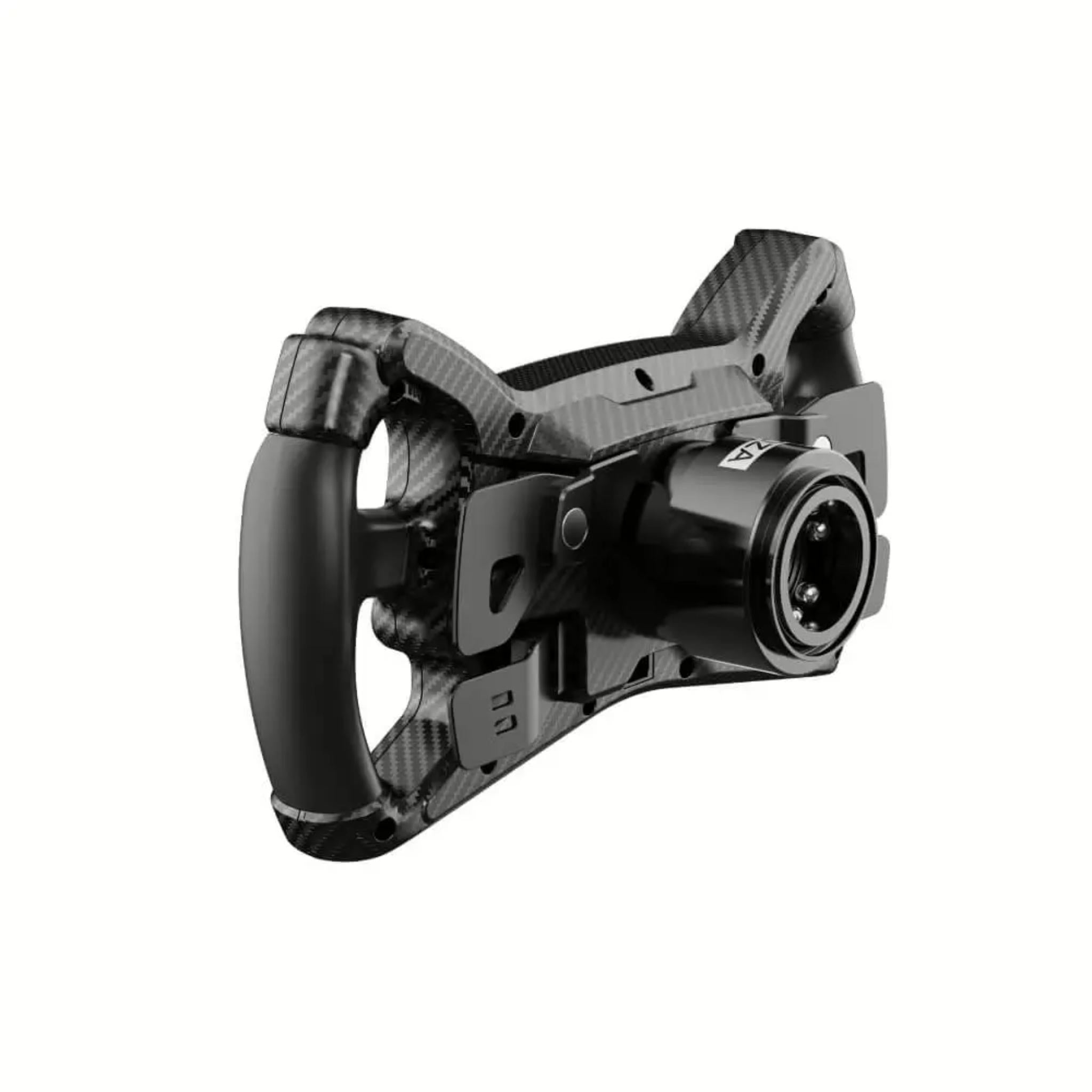
MOZA KS Steering Wheel

Sale price$279.00

Got Questions?
Email: support@simulatordirect.com
Phone: (714) 202-9416

  • American Express
  • Apple Pay
  • Diners Club
  • Discover
  • Google Pay
  • Mastercard
  • PayPal
  • Shop Pay
  • Visa

Fast & Free Shipping On Eligible Items

Exclusions Apply

Lowest Price Guarantee

Found a better price? We’ll match it — Guaranteed.

Simulator Expertise

Talk to a Real Expert
(714) 202-9416
Mon–Sat 8AM–5PM PST

Description

MOZA KS Steering Wheel

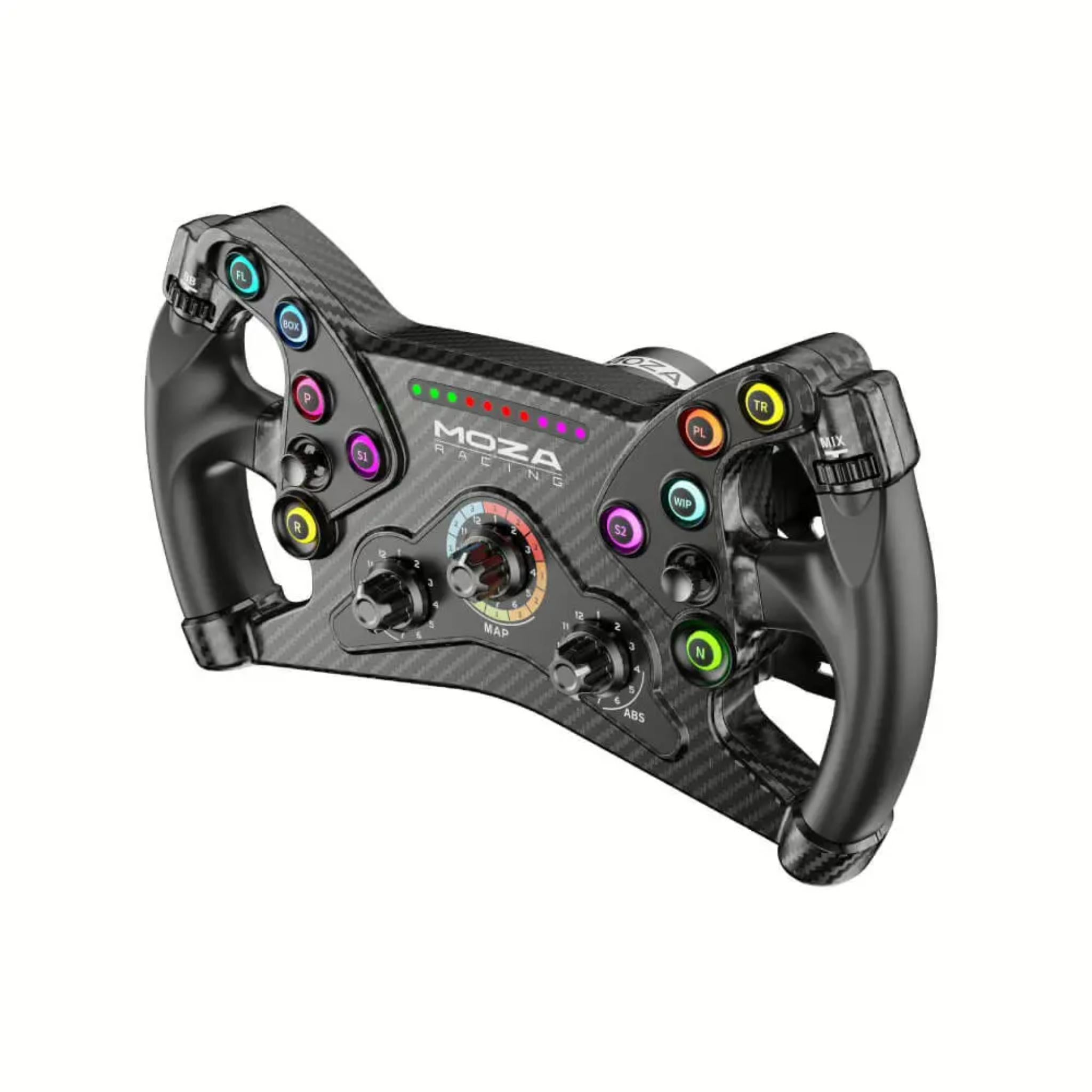
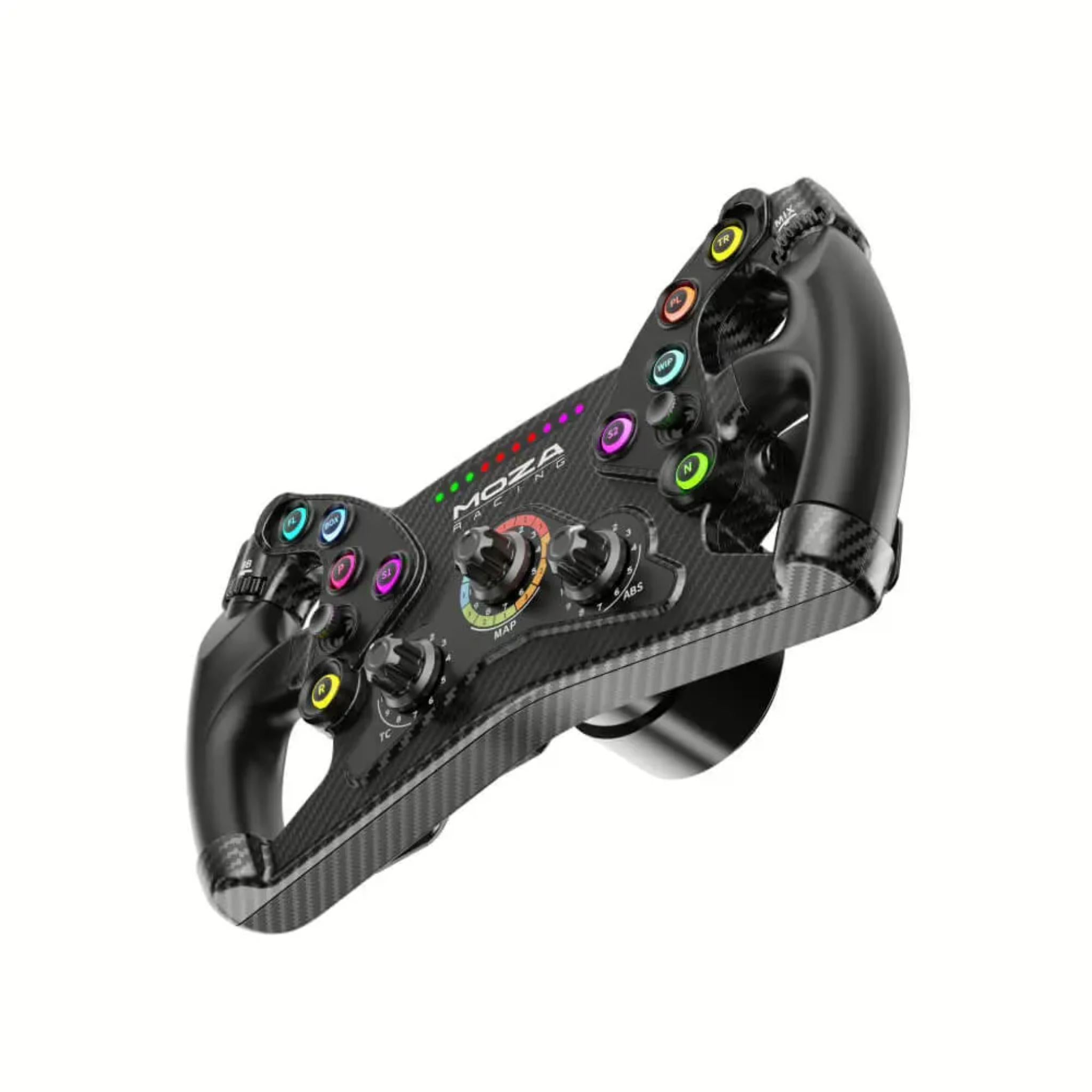
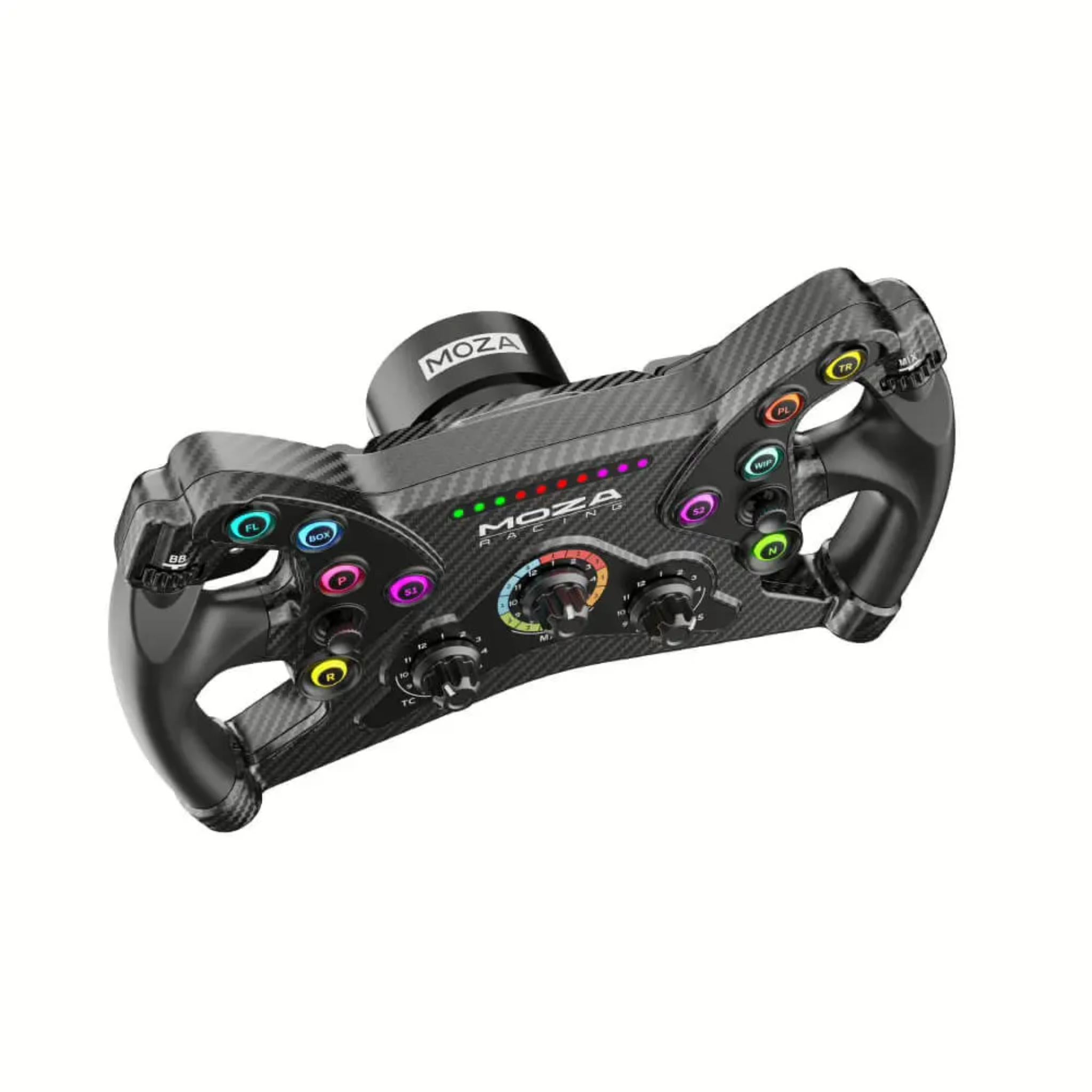
The MOZA KS GT Steering Wheel is engineered for true GT racing enthusiasts who demand precision, control, and total immersion. With its 300mm butterfly-style design, carbon fiber–reinforced composite construction, and ergonomic TPE rubber grips, this wheel delivers exceptional durability and comfort during every session.


Featuring 10 ultra-short-travel RGB buttons, multiple rotary and thumb encoders, and 70 programmable inputs, it offers unmatched customization for serious sim racers.


Equipped with magnetic hall-sensor paddles—including dual clutch functionality—the KS ensures ultra-accurate gear shifts and launch control performance. Its open ecosystem supports all MOZA non-wireless bases and third-party wheelbases through the Universal Hub Kit adapter.


With the Real Racing quick-release system and full integration with the MOZA Pit House Control Suite, the KS GT Wheel offers a premium, versatile, and highly responsive racing experience suited for competitive drivers.


Product Features

Product Features 

Feature

Details

300 mm GT Butterfly Rim

Compact 300 mm GT-style butterfly wheel for fast steering inputs and a modern GT/F1 aesthetic. 

Carbon Fiber–Reinforced Composites

Rim body made from carbon fiber–reinforced composite material for high rigidity and low flex, reinforced with metal structure for strength. 

TPE Rubber Grips

Injection-molded TPE grips designed for high friction and comfort over long sessions. 

10 RGB Short-Travel Buttons

Ten RGB push buttons with ~0.25 mm short travel and 8 customizable colors for fast inputs and clear visual grouping (ERS, TC, engine maps, etc.). 

3 Rotary Encoders

Three 12-position rotary encoders for tuning brake bias, traction control, diff settings, or engine maps on the fly. 

2 Thumb Encoders

Two 20-position thumb encoders reachable with your thumbs while keeping hands on the wheel—ideal for fuel mix, ABS, or TC adjustments. 

2 Depressible Joysticks

Dual mini-joysticks (with press function) for full menu navigation, look functions, or extra button assignments. 

70 Programmable Inputs

Up to 70 programmable input signals total (buttons, encoders, joysticks, clutch paddles) to map nearly any car/sim function you need. 

Magnetic Shifter Paddles

Two aluminum magnetic shifters using non-contact hall sensors (~0.03 mm precision) for crisp, repeatable shifts and long-term reliability. 

Dual Clutch Paddles

Two additional clutch paddles with multiple modes (combined axis, independent axis, or button), ideal for race starts and pit exits in titles like F1, iRacing, and ACC. 

RPM LED Strip

10 high-brightness RPM LEDs above the rim with 8 color options and fully adjustable patterns through MOZA Pit House. 

Open Ecosystem

Works with all MOZA wheelbases via quick-release and with 3rd party wheelbases when paired with the MOZA Universal Hub Kit (connects direct to PC). 

MOZA Quick Release

Real racing–style quick-release for fast wheel swaps between KS and other MOZA rims (GS, RS, FSR, etc.). 

Industrial Slip Ring

Uses an industrial-grade conductive slip ring for signal/power transmission, allowing unlimited rotation with stable communication. 

MOZA Pit House Support

Full configuration via MOZA Pit House on PC: button mapping, RGB colors, RPM LED behavior, clutch modes, and profiles. 

PC Sim Compatibility

Compatible with a wide range of PC sim titles via supported MOZA bases or USB connection (through hub), including iRacing, Assetto Corsa/ACC, F1 series, rFactor 2, AMS2, Dirt Rally, WRC, ETS2/ATS, and more. 


What's Included

What’s Included


    • MOZA KS Steering Wheel × 1

    • Toolkit × 1 (basic hex/key tools & screws for QR and stickers)

    • MOZA Stickers × 1 set


    Product Specifications

    Product Specifications


    General & Physical


    Spec

    Value

    Product Name

    MOZA KS Steering Wheel (KS GT Wheel) 

    Wheel Type

    300 mm GT-style butterfly rim

    Wheel Size

    300 mm standard GT wheel 

    Dimensions (L × W × H)

    300 × 120 × 165 mm 

    Weight

    ~2.6 kg 

    Rim Material

    Carbon fiber–reinforced composite shell 

    Grip Material

    Injection-molded TPE rubber 

    Paddle Material

    Aluminum alloy (shifters & clutch paddles) 


    Controls & Inputs


    Spec

    Value

    Programmable Inputs

    Up to 70 programmable signals (buttons, encoders, joysticks, paddles) 

    RGB Buttons

    10 short-travel RGB buttons (0.25 mm travel, 8 configurable colors) 

    Rotary Encoders

    3 × 12-position rotary encoders 

    Thumb Encoders

    2 × 20-position thumb encoders 

    Joysticks

    2 depressible mini-joysticks (multi-direction + push) 

    RPM LEDs

    10 high-brightness LEDs, 8 color options, customizable patterns via Pit House 

    Intelligent Telemetry

    Telemetry-driven LED and indicator support via Pit House


    Paddles & Sensing


    Spec

    Value

    Shifter Paddles

    2 magnetic shifter paddles (upshift/downshift) 

    Clutch Paddles

    2 analog clutch paddles (left/right) 

    Paddle Sensor Type

    Non-contact hall sensors (approx. 0.03 mm precision) 

    Dual Clutch Modes

    Combined axis / independent axis / button mode 


    Connectivity & Compatibility


    Spec

    Value

    Quick Release

    MOZA quick-release system 

    Communication

    Via industrial conductive slip ring (when used on MOZA base); USB connection via Universal Hub for 3rd-party bases 

    Compatible Bases

    All MOZA wheelbases; 3rd-party wheelbases via MOZA Universal Hub Kit (PC) 

    Platform

    Primarily PC (via MOZA base or USB adapter). Game compatibility depends on base/adapter and sim title. 

    Software

    MOZA Pit House (PC) + MOZA mobile app support via ecosystem


    Getting Started Guide

    Getting Started Guide


    1. Unbox and inspect the wheel

      Remove the KS wheel and accessories from the box. Confirm you have the wheel, toolkit, and stickers. Check that the rim, paddles, and encoders move freely with no visible damage.

    2. Attach the wheel to a MOZA base

      Line up the MOZA quick-release on the wheel with the QR hub on your MOZA wheelbase. Push the wheel firmly until it locks with an audible click, then gently pull to confirm it’s fully seated.

    3. (Optional) Set up with 3rd-party base via Universal Hub

      If you’re using a 3rd-party wheelbase, install the MOZA Universal Hub Kit to the base following its instructions, then connect the KS wheel to the hub and your PC via USB.

    4. Power on your system

      Turn on your wheelbase and PC. The wheel and LEDs should power up once the base is active and Pit House (or driver) detects the device.

    5. Install MOZA Pit House (PC)

      Download and install MOZA Pit House from MOZA’s official site. Open it to confirm that the KS wheel is recognized and update firmware if prompted.

    6. Configure button mappings

      In Pit House, assign important controls (ERS, DRS, pit limiter, camera, MFD navigation, etc.) to the RGB buttons, encoders, and joysticks in a layout that makes sense for you.

    7. Set RGB button and RPM LED colors

      Use Pit House to customize button colors and RPM LED patterns so you can quickly distinguish functions and match your car/sim preference.

    8. Configure clutch paddles

      Choose a clutch mode (combined axis, independent, or button) and calibrate the paddles, especially if you plan to use dual-clutch race starts.

    9. In-game control setup

      Launch your sim (iRacing, ACC, F1, etc.), select your MOZA base, and map the KS’s inputs to in-game functions. Use the joysticks for menu navigation and check that everything responds correctly.

    10. Test drive and refine

      Run a short practice session to verify shifter feel, clutch behavior, and button layout. Make any final tweaks in Pit House or in-game settings.


    Product Installation Guide

    Product Installation Guide


    1. Verify base and rig compatibility


      • Confirm your MOZA base firmware is up to date, or that your 3rd-party base is supported via the Universal Hub.

      • Ensure your rig/desk is rigid enough so the base doesn’t flex when you’re applying force.


    2. Mount the wheelbase securely

      Before installing the wheel, ensure the wheelbase itself is properly mounted to a cockpit, wheel stand, or desk clamp per the base’s instructions.

    3. Install on a MOZA wheelbase


      • Power off the base.

      • Align the KS quick-release with the base hub.

      • Push the wheel straight onto the hub until it automatically locks.

      • Tug lightly to verify the QR is fully engaged.


    4. Install via Universal Hub (for 3rd-party bases)


      • Attach the MOZA Universal Hub Kit to your 3rd-party base as instructed by MOZA.

      • Connect the KS wheel to the hub.

      • Plug the hub into your PC via USB and ensure drivers are installed.


    5. Cable routing & organization (if using hub/USB)


      • Route any USB cable neatly along your rig or desk, using zip ties or clips.

      • Make sure cables don’t interfere with pedal movement or your seat travel.


    6. Launch MOZA Pit House on PC


      • With the base powered, open Pit House.

      • Confirm the KS appears in the device list.

      • Run firmware updates for the wheel if prompted.


    7. Calibrate joysticks and clutch paddles


      • In Pit House, verify joystick centers and travel.

      • Open the clutch calibration page, fully depress and release both clutch paddles, then save.

      • Choose desired clutch mode (dual clutch, single, or button mode).


    8. Assign FFB / game functions to encoders & buttons

      Decide which encoders will control brake bias, TC, ABS, diff, etc. Assign these in Pit House or directly in your sim to ensure consistent behavior across games.

    9. Fine-tune RPM LEDs and telemetry


      • Select LED color patterns, start/end RPM points, and blinking behavior.

      • If your sim supports telemetry integration, enable the appropriate options so LEDs track engine revs accurately.


    10. Final safety check


      • With the car stationary in your sim, turn the wheel lock-to-lock and press the paddles and buttons to ensure everything responds correctly.

      • Confirm there is no physical interference between the wheel and your rig, and that the QR is solid with no play.


    Videos


    Product Manual and User Guides


    FAQ's

    Frequently Asked Questions 

    Q: Does the MOZA KS wheel work on consoles like Xbox or PlayStation?

    A: The KS itself is a PC-focused wheel. Console support depends on the wheelbase, not just the rim. It’s fully compatible with all MOZA wheelbases (which are primarily PC devices), and can connect to PC with 3rd-party bases when used with the MOZA Universal Hub. For console use, customers should check the specific base’s console compatibility. 


    Q: How many inputs does the KS actually provide?

    A: The wheel supports around 70 programmable input signals, combining 10 RGB buttons, 3 rotary encoders, 2 thumb encoders, 2 depressible joysticks, and dual-clutch paddles. That’s more than enough to map all major driving and menu functions in modern sims. 


    Q: Is the KS suitable for beginners, or is it only for advanced sim racers?

    A: It works well for both. Beginners benefit from the intuitive layout and labeled RGB buttons, while advanced drivers appreciate the 70 inputs, dual-clutch paddles, and deep customization in Pit House. Many retailers pitch it as a good “step-up” wheel for people moving into more serious GT and formula racing. 


    Q: What games can I use the KS with?

    A: When connected to a compatible base on PC, the KS works with most popular sims, including iRacing, Assetto Corsa & ACC, F1 series, rFactor 2, Automobilista 2, Dirt Rally series, WRC titles, Euro Truck Simulator 2, American Truck Simulator, BeamNG.drive, and more. The key is that the base or hub presents a supported wheel device to the game. 


    Q: Can I use the dual clutch paddles for proper F1-style race starts?

    A: Yes. The KS’s dual clutch paddles support combined axis, independent axis, and button modes, so you can run classic “bite point” launches in F1 and iRacing or simply use them as extra analog inputs or buttons in other titles. 


    Q: What’s the difference between the KS and something like the MOZA GS or FSR wheels?

    A: Broadly:


    • KS – 300 mm GT butterfly, composite body, TPE grips, rich RGB buttons/LEDs, very strong value and lots of inputs.

    • GS / FSR – Targeted more at high-end GT/formula with extra materials (for example, more exposed carbon, screens, etc.) and different ergonomics/feature sets.

      The KS is often positioned as a mid-priced GT/Formula-style wheel with a strong feature set and open-ecosystem compatibility. 


    Shipping/Returns & Warranty Policy

    Shipping Policy

    Simulator Direct fulfills MOZA Racing products through authorized ASI distribution warehouses located throughout the United States. Orders ship directly from ASI’s facilities using trusted freight and parcel carriers to help ensure secure delivery and product protection.

    Because MOZA Racing products are typically large, heavy, or freight-class items, shipping methods and timelines may differ from standard parcel shipments.

    Shipping Methods & Charges

    • ASI Partner products generally ship via freight carriers.
    • Select smaller items may ship via standard parcel services when applicable.
    • Shipping method and cost may vary based on product size, product weight, destination, and available carrier options.
    • Any applicable shipping charges will be displayed at checkout or confirmed before order fulfillment when required.

    Processing Time & Order Handling

    • Most ASI Partner orders ship same business day or next business day, depending on inventory location and order cutoff time.
    • General warehouse cutoff times:
      • East Coast warehouses: Orders placed before 2:00 PM PST may ship same day.
      • Los Angeles warehouse: Orders placed before 12:00 PM PST may ship same day.
      • Other U.S. warehouses: Orders placed before 4:00 PM PST may ship same day.
    • Orders not shipped the same day will typically ship the next business day.
    • ASI Partner warehouses operate Monday–Friday and are closed on weekends and major holidays.

    Inventory Availability & Backorders

    Inventory availability is maintained through ASI Partner’s distribution network and may vary by warehouse.

    • Inventory data is accessible through ASI systems, but it is not live and typically updates once per day.
    • An item may appear available but sell out before an order is processed.
    • Simulator Direct may confirm availability manually before finalizing an order when necessary.

    If an item becomes unavailable after order placement:

    • Simulator Direct will notify the customer.
    • Options may include holding the order, partial shipment if supported, or cancellation with refund.
    • Estimated restock timelines will be communicated when available.

    Tracking & Delivery

    • Tracking information will be provided by email once your order ships.
    • Freight deliveries are typically curbside delivery unless otherwise arranged.
    • If special delivery services are required, please contact support@simulatordirect.com before placing the order.
      • Examples may include lift gate service, inside delivery, or scheduled delivery appointment.
      • Availability and added costs must be confirmed before fulfillment.

    Return Policy

    Returns for ASI Partner-fulfilled products follow ASI Partner’s official return policy.

    Because ASI Partner operates as a distribution provider rather than a retail storefront, return eligibility, restocking fees, and return shipping costs may vary by product and circumstance.

    Return Authorization & Conditions

    • All returns require prior written authorization from Simulator Direct.
    • Unauthorized returns may be refused or returned to the sender.
    • Items must be returned in original packaging, unused, and in resalable condition unless otherwise approved.
    • Certain items may be non-returnable due to size, customization, or manufacturer restrictions.
    • Special return approvals may be granted on a case-by-case basis and are subject to ASI Partner’s acceptance.

    Return Shipping & Fees

    • Customers are responsible for all return shipping costs unless the return is due to an error or defect.
    • Original shipping charges are non-refundable.
    • Restocking fees may apply per ASI Partner’s return policy.
    • Carrier fees associated with refused deliveries, storage, or re-routing may be deducted from the refund.
    • Refunds are issued only after ASI Partner receives, inspects, and approves the returned item.

    Damaged or Incorrect Items

    If your order arrives damaged or incorrect:

    • Contact support@simulatordirect.com promptly.
    • Provide your order number, photos of the damage or issue, and a description.
    • Simulator Direct will coordinate directly with ASI Partner to resolve the issue in accordance with their policies.

    Order Changes & Cancellations

    Orders are processed quickly once submitted.

    • Orders not yet shipped may be eligible for cancellation or modification.
    • Orders that have shipped or entered fulfillment may be subject to return policies and applicable fees.
    • Late-stage cancellations may incur shipping or handling charges.
    • Please contact support immediately if changes are needed.

    Questions or Assistance

    For any ASI Partner-related shipping, returns, or order questions, contact:

    support@simulatordirect.com

    We will coordinate directly with ASI Partner on your behalf to help ensure a smooth experience.

    Description

    MOZA KS Steering Wheel

    The MOZA KS GT Steering Wheel is engineered for true GT racing enthusiasts who demand precision, control, and total immersion. With its 300mm butterfly-style design, carbon fiber–reinforced composite construction, and ergonomic TPE rubber grips, this wheel delivers exceptional durability and comfort during every session.


    Featuring 10 ultra-short-travel RGB buttons, multiple rotary and thumb encoders, and 70 programmable inputs, it offers unmatched customization for serious sim racers.


    Equipped with magnetic hall-sensor paddles—including dual clutch functionality—the KS ensures ultra-accurate gear shifts and launch control performance. Its open ecosystem supports all MOZA non-wireless bases and third-party wheelbases through the Universal Hub Kit adapter.


    With the Real Racing quick-release system and full integration with the MOZA Pit House Control Suite, the KS GT Wheel offers a premium, versatile, and highly responsive racing experience suited for competitive drivers.


    Product Features

    Product Features 

    Feature

    Details

    300 mm GT Butterfly Rim

    Compact 300 mm GT-style butterfly wheel for fast steering inputs and a modern GT/F1 aesthetic. 

    Carbon Fiber–Reinforced Composites

    Rim body made from carbon fiber–reinforced composite material for high rigidity and low flex, reinforced with metal structure for strength. 

    TPE Rubber Grips

    Injection-molded TPE grips designed for high friction and comfort over long sessions. 

    10 RGB Short-Travel Buttons

    Ten RGB push buttons with ~0.25 mm short travel and 8 customizable colors for fast inputs and clear visual grouping (ERS, TC, engine maps, etc.). 

    3 Rotary Encoders

    Three 12-position rotary encoders for tuning brake bias, traction control, diff settings, or engine maps on the fly. 

    2 Thumb Encoders

    Two 20-position thumb encoders reachable with your thumbs while keeping hands on the wheel—ideal for fuel mix, ABS, or TC adjustments. 

    2 Depressible Joysticks

    Dual mini-joysticks (with press function) for full menu navigation, look functions, or extra button assignments. 

    70 Programmable Inputs

    Up to 70 programmable input signals total (buttons, encoders, joysticks, clutch paddles) to map nearly any car/sim function you need. 

    Magnetic Shifter Paddles

    Two aluminum magnetic shifters using non-contact hall sensors (~0.03 mm precision) for crisp, repeatable shifts and long-term reliability. 

    Dual Clutch Paddles

    Two additional clutch paddles with multiple modes (combined axis, independent axis, or button), ideal for race starts and pit exits in titles like F1, iRacing, and ACC. 

    RPM LED Strip

    10 high-brightness RPM LEDs above the rim with 8 color options and fully adjustable patterns through MOZA Pit House. 

    Open Ecosystem

    Works with all MOZA wheelbases via quick-release and with 3rd party wheelbases when paired with the MOZA Universal Hub Kit (connects direct to PC). 

    MOZA Quick Release

    Real racing–style quick-release for fast wheel swaps between KS and other MOZA rims (GS, RS, FSR, etc.). 

    Industrial Slip Ring

    Uses an industrial-grade conductive slip ring for signal/power transmission, allowing unlimited rotation with stable communication. 

    MOZA Pit House Support

    Full configuration via MOZA Pit House on PC: button mapping, RGB colors, RPM LED behavior, clutch modes, and profiles. 

    PC Sim Compatibility

    Compatible with a wide range of PC sim titles via supported MOZA bases or USB connection (through hub), including iRacing, Assetto Corsa/ACC, F1 series, rFactor 2, AMS2, Dirt Rally, WRC, ETS2/ATS, and more. 


    What's Included

    What’s Included


      • MOZA KS Steering Wheel × 1

      • Toolkit × 1 (basic hex/key tools & screws for QR and stickers)

      • MOZA Stickers × 1 set


      Product Specifications

      Product Specifications


      General & Physical


      Spec

      Value

      Product Name

      MOZA KS Steering Wheel (KS GT Wheel) 

      Wheel Type

      300 mm GT-style butterfly rim

      Wheel Size

      300 mm standard GT wheel 

      Dimensions (L × W × H)

      300 × 120 × 165 mm 

      Weight

      ~2.6 kg 

      Rim Material

      Carbon fiber–reinforced composite shell 

      Grip Material

      Injection-molded TPE rubber 

      Paddle Material

      Aluminum alloy (shifters & clutch paddles) 


      Controls & Inputs


      Spec

      Value

      Programmable Inputs

      Up to 70 programmable signals (buttons, encoders, joysticks, paddles) 

      RGB Buttons

      10 short-travel RGB buttons (0.25 mm travel, 8 configurable colors) 

      Rotary Encoders

      3 × 12-position rotary encoders 

      Thumb Encoders

      2 × 20-position thumb encoders 

      Joysticks

      2 depressible mini-joysticks (multi-direction + push) 

      RPM LEDs

      10 high-brightness LEDs, 8 color options, customizable patterns via Pit House 

      Intelligent Telemetry

      Telemetry-driven LED and indicator support via Pit House


      Paddles & Sensing


      Spec

      Value

      Shifter Paddles

      2 magnetic shifter paddles (upshift/downshift) 

      Clutch Paddles

      2 analog clutch paddles (left/right) 

      Paddle Sensor Type

      Non-contact hall sensors (approx. 0.03 mm precision) 

      Dual Clutch Modes

      Combined axis / independent axis / button mode 


      Connectivity & Compatibility


      Spec

      Value

      Quick Release

      MOZA quick-release system 

      Communication

      Via industrial conductive slip ring (when used on MOZA base); USB connection via Universal Hub for 3rd-party bases 

      Compatible Bases

      All MOZA wheelbases; 3rd-party wheelbases via MOZA Universal Hub Kit (PC) 

      Platform

      Primarily PC (via MOZA base or USB adapter). Game compatibility depends on base/adapter and sim title. 

      Software

      MOZA Pit House (PC) + MOZA mobile app support via ecosystem


      Getting Started Guide

      Getting Started Guide


      1. Unbox and inspect the wheel

        Remove the KS wheel and accessories from the box. Confirm you have the wheel, toolkit, and stickers. Check that the rim, paddles, and encoders move freely with no visible damage.

      2. Attach the wheel to a MOZA base

        Line up the MOZA quick-release on the wheel with the QR hub on your MOZA wheelbase. Push the wheel firmly until it locks with an audible click, then gently pull to confirm it’s fully seated.

      3. (Optional) Set up with 3rd-party base via Universal Hub

        If you’re using a 3rd-party wheelbase, install the MOZA Universal Hub Kit to the base following its instructions, then connect the KS wheel to the hub and your PC via USB.

      4. Power on your system

        Turn on your wheelbase and PC. The wheel and LEDs should power up once the base is active and Pit House (or driver) detects the device.

      5. Install MOZA Pit House (PC)

        Download and install MOZA Pit House from MOZA’s official site. Open it to confirm that the KS wheel is recognized and update firmware if prompted.

      6. Configure button mappings

        In Pit House, assign important controls (ERS, DRS, pit limiter, camera, MFD navigation, etc.) to the RGB buttons, encoders, and joysticks in a layout that makes sense for you.

      7. Set RGB button and RPM LED colors

        Use Pit House to customize button colors and RPM LED patterns so you can quickly distinguish functions and match your car/sim preference.

      8. Configure clutch paddles

        Choose a clutch mode (combined axis, independent, or button) and calibrate the paddles, especially if you plan to use dual-clutch race starts.

      9. In-game control setup

        Launch your sim (iRacing, ACC, F1, etc.), select your MOZA base, and map the KS’s inputs to in-game functions. Use the joysticks for menu navigation and check that everything responds correctly.

      10. Test drive and refine

        Run a short practice session to verify shifter feel, clutch behavior, and button layout. Make any final tweaks in Pit House or in-game settings.


      Product Installation Guide

      Product Installation Guide


      1. Verify base and rig compatibility


        • Confirm your MOZA base firmware is up to date, or that your 3rd-party base is supported via the Universal Hub.

        • Ensure your rig/desk is rigid enough so the base doesn’t flex when you’re applying force.


      2. Mount the wheelbase securely

        Before installing the wheel, ensure the wheelbase itself is properly mounted to a cockpit, wheel stand, or desk clamp per the base’s instructions.

      3. Install on a MOZA wheelbase


        • Power off the base.

        • Align the KS quick-release with the base hub.

        • Push the wheel straight onto the hub until it automatically locks.

        • Tug lightly to verify the QR is fully engaged.


      4. Install via Universal Hub (for 3rd-party bases)


        • Attach the MOZA Universal Hub Kit to your 3rd-party base as instructed by MOZA.

        • Connect the KS wheel to the hub.

        • Plug the hub into your PC via USB and ensure drivers are installed.


      5. Cable routing & organization (if using hub/USB)


        • Route any USB cable neatly along your rig or desk, using zip ties or clips.

        • Make sure cables don’t interfere with pedal movement or your seat travel.


      6. Launch MOZA Pit House on PC


        • With the base powered, open Pit House.

        • Confirm the KS appears in the device list.

        • Run firmware updates for the wheel if prompted.


      7. Calibrate joysticks and clutch paddles


        • In Pit House, verify joystick centers and travel.

        • Open the clutch calibration page, fully depress and release both clutch paddles, then save.

        • Choose desired clutch mode (dual clutch, single, or button mode).


      8. Assign FFB / game functions to encoders & buttons

        Decide which encoders will control brake bias, TC, ABS, diff, etc. Assign these in Pit House or directly in your sim to ensure consistent behavior across games.

      9. Fine-tune RPM LEDs and telemetry


        • Select LED color patterns, start/end RPM points, and blinking behavior.

        • If your sim supports telemetry integration, enable the appropriate options so LEDs track engine revs accurately.


      10. Final safety check


        • With the car stationary in your sim, turn the wheel lock-to-lock and press the paddles and buttons to ensure everything responds correctly.

        • Confirm there is no physical interference between the wheel and your rig, and that the QR is solid with no play.


      Videos


      Product Manual and User Guides


      FAQ's

      Frequently Asked Questions 

      Q: Does the MOZA KS wheel work on consoles like Xbox or PlayStation?

      A: The KS itself is a PC-focused wheel. Console support depends on the wheelbase, not just the rim. It’s fully compatible with all MOZA wheelbases (which are primarily PC devices), and can connect to PC with 3rd-party bases when used with the MOZA Universal Hub. For console use, customers should check the specific base’s console compatibility. 


      Q: How many inputs does the KS actually provide?

      A: The wheel supports around 70 programmable input signals, combining 10 RGB buttons, 3 rotary encoders, 2 thumb encoders, 2 depressible joysticks, and dual-clutch paddles. That’s more than enough to map all major driving and menu functions in modern sims. 


      Q: Is the KS suitable for beginners, or is it only for advanced sim racers?

      A: It works well for both. Beginners benefit from the intuitive layout and labeled RGB buttons, while advanced drivers appreciate the 70 inputs, dual-clutch paddles, and deep customization in Pit House. Many retailers pitch it as a good “step-up” wheel for people moving into more serious GT and formula racing. 


      Q: What games can I use the KS with?

      A: When connected to a compatible base on PC, the KS works with most popular sims, including iRacing, Assetto Corsa & ACC, F1 series, rFactor 2, Automobilista 2, Dirt Rally series, WRC titles, Euro Truck Simulator 2, American Truck Simulator, BeamNG.drive, and more. The key is that the base or hub presents a supported wheel device to the game. 


      Q: Can I use the dual clutch paddles for proper F1-style race starts?

      A: Yes. The KS’s dual clutch paddles support combined axis, independent axis, and button modes, so you can run classic “bite point” launches in F1 and iRacing or simply use them as extra analog inputs or buttons in other titles. 


      Q: What’s the difference between the KS and something like the MOZA GS or FSR wheels?

      A: Broadly:


      • KS – 300 mm GT butterfly, composite body, TPE grips, rich RGB buttons/LEDs, very strong value and lots of inputs.

      • GS / FSR – Targeted more at high-end GT/formula with extra materials (for example, more exposed carbon, screens, etc.) and different ergonomics/feature sets.

        The KS is often positioned as a mid-priced GT/Formula-style wheel with a strong feature set and open-ecosystem compatibility. 


      Shipping/Returns & Warranty Policy

      Shipping Policy

      Simulator Direct fulfills MOZA Racing products through authorized ASI distribution warehouses located throughout the United States. Orders ship directly from ASI’s facilities using trusted freight and parcel carriers to help ensure secure delivery and product protection.

      Because MOZA Racing products are typically large, heavy, or freight-class items, shipping methods and timelines may differ from standard parcel shipments.

      Shipping Methods & Charges

      • ASI Partner products generally ship via freight carriers.
      • Select smaller items may ship via standard parcel services when applicable.
      • Shipping method and cost may vary based on product size, product weight, destination, and available carrier options.
      • Any applicable shipping charges will be displayed at checkout or confirmed before order fulfillment when required.

      Processing Time & Order Handling

      • Most ASI Partner orders ship same business day or next business day, depending on inventory location and order cutoff time.
      • General warehouse cutoff times:
        • East Coast warehouses: Orders placed before 2:00 PM PST may ship same day.
        • Los Angeles warehouse: Orders placed before 12:00 PM PST may ship same day.
        • Other U.S. warehouses: Orders placed before 4:00 PM PST may ship same day.
      • Orders not shipped the same day will typically ship the next business day.
      • ASI Partner warehouses operate Monday–Friday and are closed on weekends and major holidays.

      Inventory Availability & Backorders

      Inventory availability is maintained through ASI Partner’s distribution network and may vary by warehouse.

      • Inventory data is accessible through ASI systems, but it is not live and typically updates once per day.
      • An item may appear available but sell out before an order is processed.
      • Simulator Direct may confirm availability manually before finalizing an order when necessary.

      If an item becomes unavailable after order placement:

      • Simulator Direct will notify the customer.
      • Options may include holding the order, partial shipment if supported, or cancellation with refund.
      • Estimated restock timelines will be communicated when available.

      Tracking & Delivery

      • Tracking information will be provided by email once your order ships.
      • Freight deliveries are typically curbside delivery unless otherwise arranged.
      • If special delivery services are required, please contact support@simulatordirect.com before placing the order.
        • Examples may include lift gate service, inside delivery, or scheduled delivery appointment.
        • Availability and added costs must be confirmed before fulfillment.

      Return Policy

      Returns for ASI Partner-fulfilled products follow ASI Partner’s official return policy.

      Because ASI Partner operates as a distribution provider rather than a retail storefront, return eligibility, restocking fees, and return shipping costs may vary by product and circumstance.

      Return Authorization & Conditions

      • All returns require prior written authorization from Simulator Direct.
      • Unauthorized returns may be refused or returned to the sender.
      • Items must be returned in original packaging, unused, and in resalable condition unless otherwise approved.
      • Certain items may be non-returnable due to size, customization, or manufacturer restrictions.
      • Special return approvals may be granted on a case-by-case basis and are subject to ASI Partner’s acceptance.

      Return Shipping & Fees

      • Customers are responsible for all return shipping costs unless the return is due to an error or defect.
      • Original shipping charges are non-refundable.
      • Restocking fees may apply per ASI Partner’s return policy.
      • Carrier fees associated with refused deliveries, storage, or re-routing may be deducted from the refund.
      • Refunds are issued only after ASI Partner receives, inspects, and approves the returned item.

      Damaged or Incorrect Items

      If your order arrives damaged or incorrect:

      • Contact support@simulatordirect.com promptly.
      • Provide your order number, photos of the damage or issue, and a description.
      • Simulator Direct will coordinate directly with ASI Partner to resolve the issue in accordance with their policies.

      Order Changes & Cancellations

      Orders are processed quickly once submitted.

      • Orders not yet shipped may be eligible for cancellation or modification.
      • Orders that have shipped or entered fulfillment may be subject to return policies and applicable fees.
      • Late-stage cancellations may incur shipping or handling charges.
      • Please contact support immediately if changes are needed.

      Questions or Assistance

      For any ASI Partner-related shipping, returns, or order questions, contact:

      support@simulatordirect.com

      We will coordinate directly with ASI Partner on your behalf to help ensure a smooth experience.