
Skip to content

Cart

Your cart is empty

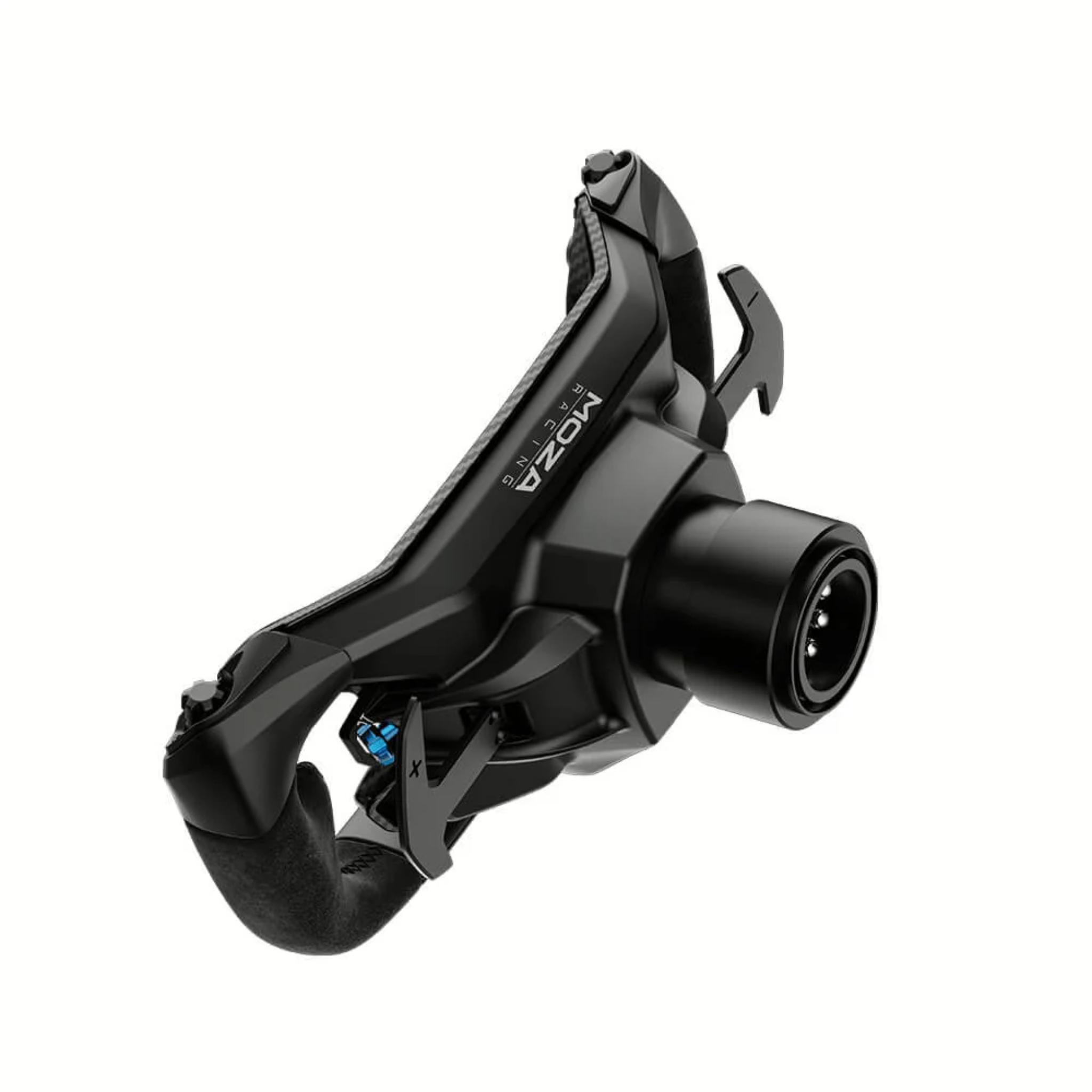
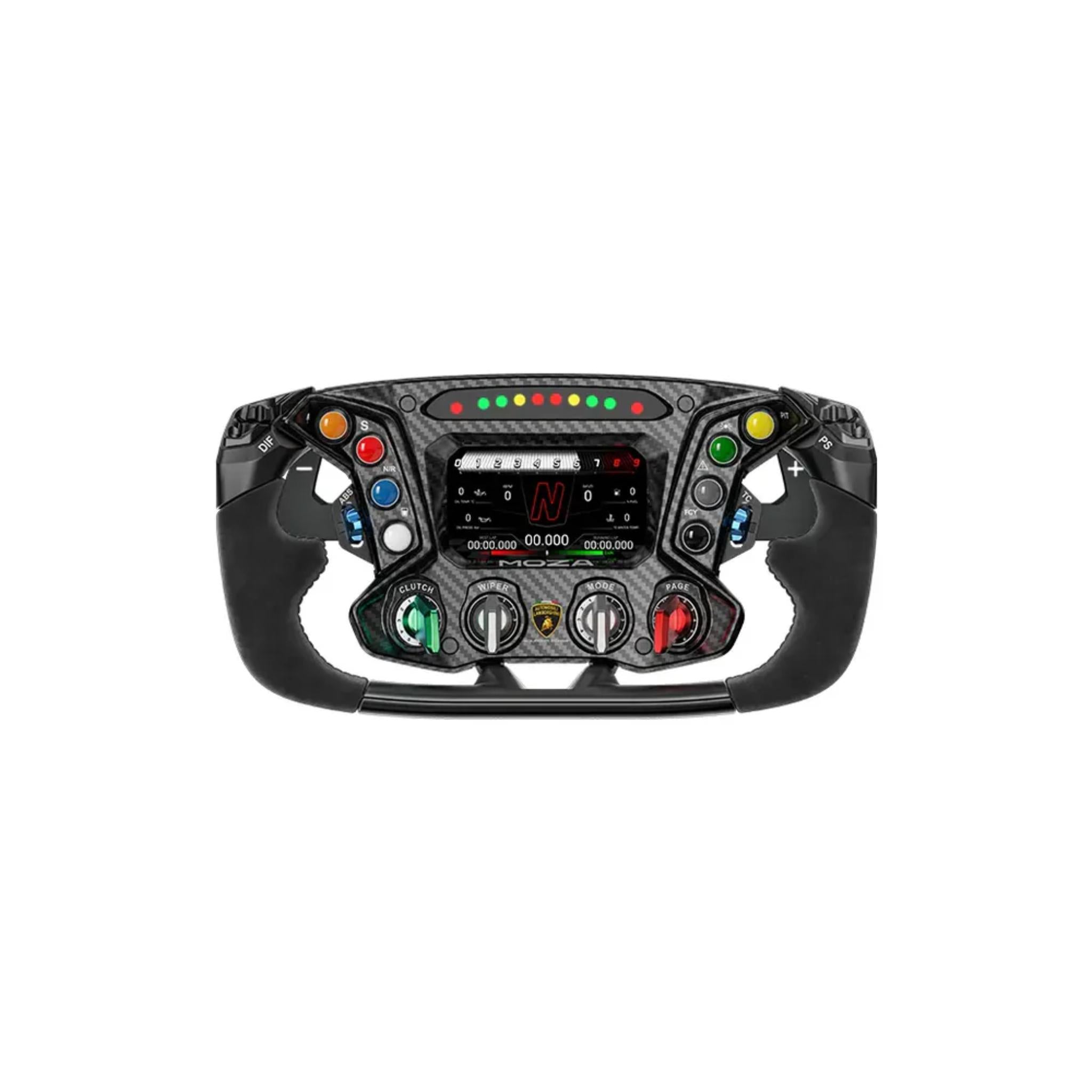
MOZA ESSENZA SCV12 Steering Wheel

Sale price$1,299.00

Got Questions?
Email: support@simulatordirect.com
Phone: (714) 202-9416

  • American Express
  • Apple Pay
  • Diners Club
  • Discover
  • Google Pay
  • Mastercard
  • PayPal
  • Shop Pay
  • Visa

Fast & Free Shipping On Eligible Items

Exclusions Apply

Lowest Price Guarantee

Found a better price? We’ll match it — Guaranteed.

Simulator Expertise

Talk to a Real Expert
(714) 202-9416
Mon–Sat 8AM–5PM PST

Description

MOZA ESSENZA SCV12 Steering Wheel

Bring the thrill of a Lamborghini Essenza SCV12 hypercar directly to your sim racing rig with the MOZA Essenza SCV12 Steering Wheel.


Crafted in collaboration with Automobili Lamborghini Squadra Corse, this officially licensed wheel replicates the original hypercar design using CAD data from the 40-unit limited-edition SCV12.

Every detail, from the ergonomic suede grips to the racing-grade aluminum paddles, is engineered to deliver unparalleled realism and professional-grade performance for dedicated sim racers and Lamborghini enthusiasts.

Equipped with 72 programmable inputs, a 4.3-inch interactive touchscreen, and RGB LED rev and flag indicators, the Essenza SCV12 wheel puts total control at your fingertips.


The premium materials, including suede leather grips, carbon fiber faceplate, and aluminum alloy paddles, ensure durability and an authentic motorsport feel. Fully compatible with all MOZA bases and select third-party systems via the MOZA hub, this wheel is the ultimate tool for high-fidelity simulation.

Product Features

Product Features 

Feature

Details

Official Lamborghini License

Co-developed with Automobili Lamborghini Squadra Corse as an officially licensed replica of the Essenza SCV12 hypercar’s steering wheel.

Authentic Hypercar Layout

Proportions, button placement, and overall design are closely matched to the real Essenza SCV12 wheel, delivering a very realistic cockpit feel.

4.3” Color Touchscreen

Integrated 4.3-inch LCD touchscreen (800×480) for telemetry, timing, and customizable dash layouts with Lamborghini-themed UIs.

72 Programmable Inputs

Up to 72 user-assignable signals from 8 backlit buttons, 4 thumb encoders, and 4 multi-mode rotary encoders, plus their multi-position modes.

Premium Materials

Carbon fiber face plate, CNC aluminum frame and rear housing, suede leather grips, and aluminum rotary knobs for a race-grade build and feel.

Suede Leather Grips

High-quality suede grips provide excellent anti-slip control and match the interior materials used in Lamborghini’s own race cars.

Aluminum Paddle Shifters

Racing-style aluminum paddle shifters with crisp feedback, tested for long-term durability under repeated use.

RGB Rev & Flag LEDs

10 RGB rev LEDs plus side flag/status LEDs with 16.7 million color options for RPM, flags, and system alerts.

Fully Customizable UI

Display can show gear, revs, lap times, temps, pedal inputs, track maps, and more; layouts are configurable through MOZA Pit House with multiple presets.

Aluminum Quick Release

Integrated aluminum quick-release inspired by motorsport hubs, providing fast wheel swaps and a rigid connection to MOZA bases.

MOZA Ecosystem Support

Full support in MOZA Pit House for LED behavior, display layouts, and input mapping; works with all MOZA wheelbases currently on sale.

Third-Party Base Compatibility

Compatible with select third-party wheelbases via the MOZA Universal Hub Kit, allowing use beyond just MOZA bases.

What's Included

What’s Included


  • Essenza SCV12 Sim-Racing Steering Wheel × 1

  • Custom Presentation Box × 1

  • MOZA Sticker × 1


Product Specifications

Product Specifications


Physical & Materials


Spec

Value

Product Name

Automobili Lamborghini Squadra Corse Essenza SCV12 Sim-Racing Steering Wheel

Dimensions

310 mm × 164 mm × 175 mm

Weight

1950 g

Face Plate

Carbon fiber

Grip Material

Suede leather

Back Plate

Aluminum alloy

Shifter Paddles

Aluminum alloy (2 paddles)

Rotary Knobs

Aluminum alloy


Display & Lighting


Spec

Value

Display Type

Color LCD touchscreen

Display Size

4.3 inches

Resolution

800 × 480

UI System

Fully customizable with multiple preset dashboards via MOZA Pit House

RPM LEDs

10 RGB rev LEDs

LED Colors

16.7 million colors (256 × 256 × 256) for shift and status indicators


Controls & Inputs


Spec

Value

Buttons

8 (backlit)

Thumb Encoders

4

Rotary Encoders

4 (12 positions each)

Rotary Encoder Modes

Incremental mode (increase/decrease) and discrete mode (12 distinct positions)

Programmable Inputs

72 total programmable signals (combined from buttons & encoder modes)


Connectivity & Compatibility


Spec

Value

Quick Release

Integrated quick-release, aluminum alloy

MOZA Pit House Support

Yes – full configuration, mapping, and UI control

MOZA Base Compatibility

Compatible with all current MOZA wheelbases

Third-Party Bases

Works with select non-MOZA bases via MOZA Hub Kit (sold separately)


Getting Started Guide

Getting Started Guide


  1. Unbox and inspect

    Carefully remove the Essenza SCV12 wheel, custom box, and sticker. Inspect the carbon face, display, paddles, and quick-release hub for any visible damage or loose parts.

  2. Confirm base compatibility

    Make sure you’re using a MOZA wheelbase or a supported third-party base with MOZA Universal Hub Kit before proceeding.

  3. Power off the wheelbase

    Turn off and, if possible, unplug your wheelbase before mounting the wheel to prevent unexpected movement during installation.

  4. Mount the wheel with the quick release

    Align the Essenza SCV12 wheel’s quick-release hub with the base, keeping the wheel centered. Push firmly until you feel and/or hear it lock in place. Gently pull and twist to confirm there’s no play.

  5. Reconnect power and USB

    Power your base and PC back on, ensuring the base is properly connected to your computer or console (depending on your setup).

  6. Install or open MOZA Pit House

    Download the latest version of MOZA Pit House from MOZA’s site. Launch it and confirm the Essenza SCV12 wheel is detected.

  7. Run basic calibration

    Use Pit House to center the wheel and verify that buttons, encoders, and paddle shifters all register input correctly.

  8. Choose a dashboard layout

    Select one of the preset Lamborghini-style dashboards or a preferred layout for the 4.3” screen. Adjust what info you see (RPM, gear, lap times, etc.) to suit your sim.

  9. Set RPM and flag LEDs

    Configure your rev lights and flag indicators—colors, brightness, and RPM thresholds—so they match your car or league requirements.

  10. Map controls in your sim

    Open your racing title (iRacing, ACC, F1, etc.) and bind all primary controls (shifting, pit limiter, brake bias, engine maps, etc.) to the wheel inputs. Save a control profile for easy reuse.


Product Installation Guide

Product Installation Guide


  1. Prepare your rig and seating position


    • Ensure your wheelbase is tightly mounted to your cockpit or stand, with minimal flex.

    • Set your seat and pedal distance before finalizing wheel placement so the 310 mm wheel sits at a natural reach.


  2. Check quick-release and hub


    • Inspect the MOZA quick-release hub and the wheel-side splines for dust or damage.

    • Confirm any hub screws are fully tightened according to MOZA’s documentation.


  3. Attach the wheel


    • With the base powered off, align the wheel’s QR with the base hub.

    • Push straight on until fully seated and locked.

    • Apply slight torque left/right and a gentle pull to ensure the connection is solid.


  4. Install with a third-party base (if applicable)


    • Attach the MOZA Universal Hub Kit to your non-MOZA base following the hub’s instructions.

    • Connect any required USB/data cables from the hub to your PC.

    • Mount the Essenza SCV12 wheel to the hub’s quick-release.


  5. Cable routing and safety


    • Make sure all cables from the base or hub are routed away from your feet, pedals, and seat rails.

    • Use cable clips or ties to secure them and avoid snags during racing.


  6. Software and firmware updates


    • Open MOZA Pit House and check for firmware updates for your wheel and base.

    • Update as recommended, following on-screen steps and power-cycling if required.


  7. Configure display and LEDs


    • In Pit House, choose a dashboard and configure what the 4.3” screen displays.

    • Set RPM LED behavior (gradual, flashing at redline, etc.) as well as colors for flag indicators.


  8. Tune inputs and encoder modes


    • Decide whether rotary encoders run in incremental mode (simple up/down) or discrete mode (12 distinct positions) depending on how you want to adjust settings like TC or brake bias.


  9. Set up per-game profiles


    • Create separate Pit House profiles for different sims or car classes (e.g., GT vs prototype).

    • Store layouts, LED timing, and button maps per profile.


  10. Final test and inspection


    • Enter a practice session, test all buttons, encoders, and paddles while stationary, then at speed.

    • Listen for unusual noises and check again that the wheel is firmly locked to the base.


Videos


Product Manual and User Guides


FAQ's

Frequently Asked Questions 


Q: What wheelbases is the Essenza SCV12 wheel compatible with?

A: The Essenza SCV12 wheel works with all current MOZA wheelbases and can also be adapted to select third-party bases via the MOZA Universal Hub Kit, giving you flexibility if you already own a non-MOZA base.


Q: Is this a genuine Lamborghini product or just a “Lambo-style” wheel?

A: It’s an officially licensed Automobili Lamborghini Squadra Corse product, designed as a close replica of the Lamborghini Essenza SCV12 hypercar steering wheel, using Lamborghini design data and materials that echo the real car’s cockpit.


Q: What does the 4.3” touchscreen actually do in-game?

A: The touchscreen acts as a dynamic dash, showing telemetry, lap times, gear, RPM, temperatures, and even pedal inputs, depending on the layout you choose. Through MOZA Pit House, you can switch dashboards, adjust layouts, and use Lamborghini-themed UIs tailored to your sims.


Q: How many controls can I map, and what can they be used for?

A: The wheel supports up to 72 programmable input signals using its combination of buttons and multi-mode rotary encoders. You can assign them to brake bias, differential settings, traction/ABS levels, engine modes, pit functions, and more—essentially anything your sim allows you to bind.


Q: What materials does the wheel use, and how durable is it?

A: The Essenza SCV12 wheel uses a carbon fiber face plate, CNC-machined aluminum frame and back, aluminum shifters and knobs, and suede leather grips. Components are tested to withstand extensive use (millions of actuations across frame and switches), making it suitable for heavy daily and league racing.


Q: Can I use this wheel on console?

A: Console support depends on your wheelbase. The wheel itself is designed to connect through MOZA or compatible bases; if your base is supported on console (e.g., via MOZA’s console-compatible ecosystem), the wheel can be used there as well. Check your wheelbase’s platform compatibility for details.


Q: Is this wheel only for hypercar / GT racing?

A: While it’s modeled after a Lamborghini hypercar wheel, many sim racers use it across GT, prototype, and track-focused content because of its versatile input layout, premium feel, and built-in display. It’s ideal anywhere a compact, button-rich GT/Formula-style wheel is an advantage.

Shipping/Returns & Warranty Policy

Shipping Policy

Simulator Direct fulfills MOZA Racing products through authorized ASI distribution warehouses located throughout the United States. Orders ship directly from ASI’s facilities using trusted freight and parcel carriers to help ensure secure delivery and product protection.

Because MOZA Racing products are typically large, heavy, or freight-class items, shipping methods and timelines may differ from standard parcel shipments.

Shipping Methods & Charges

  • ASI Partner products generally ship via freight carriers.
  • Select smaller items may ship via standard parcel services when applicable.
  • Shipping method and cost may vary based on product size, product weight, destination, and available carrier options.
  • Any applicable shipping charges will be displayed at checkout or confirmed before order fulfillment when required.

Processing Time & Order Handling

  • Most ASI Partner orders ship same business day or next business day, depending on inventory location and order cutoff time.
  • General warehouse cutoff times:
    • East Coast warehouses: Orders placed before 2:00 PM PST may ship same day.
    • Los Angeles warehouse: Orders placed before 12:00 PM PST may ship same day.
    • Other U.S. warehouses: Orders placed before 4:00 PM PST may ship same day.
  • Orders not shipped the same day will typically ship the next business day.
  • ASI Partner warehouses operate Monday–Friday and are closed on weekends and major holidays.

Inventory Availability & Backorders

Inventory availability is maintained through ASI Partner’s distribution network and may vary by warehouse.

  • Inventory data is accessible through ASI systems, but it is not live and typically updates once per day.
  • An item may appear available but sell out before an order is processed.
  • Simulator Direct may confirm availability manually before finalizing an order when necessary.

If an item becomes unavailable after order placement:

  • Simulator Direct will notify the customer.
  • Options may include holding the order, partial shipment if supported, or cancellation with refund.
  • Estimated restock timelines will be communicated when available.

Tracking & Delivery

  • Tracking information will be provided by email once your order ships.
  • Freight deliveries are typically curbside delivery unless otherwise arranged.
  • If special delivery services are required, please contact support@simulatordirect.com before placing the order.
    • Examples may include lift gate service, inside delivery, or scheduled delivery appointment.
    • Availability and added costs must be confirmed before fulfillment.

Return Policy

Returns for ASI Partner-fulfilled products follow ASI Partner’s official return policy.

Because ASI Partner operates as a distribution provider rather than a retail storefront, return eligibility, restocking fees, and return shipping costs may vary by product and circumstance.

Return Authorization & Conditions

  • All returns require prior written authorization from Simulator Direct.
  • Unauthorized returns may be refused or returned to the sender.
  • Items must be returned in original packaging, unused, and in resalable condition unless otherwise approved.
  • Certain items may be non-returnable due to size, customization, or manufacturer restrictions.
  • Special return approvals may be granted on a case-by-case basis and are subject to ASI Partner’s acceptance.

Return Shipping & Fees

  • Customers are responsible for all return shipping costs unless the return is due to an error or defect.
  • Original shipping charges are non-refundable.
  • Restocking fees may apply per ASI Partner’s return policy.
  • Carrier fees associated with refused deliveries, storage, or re-routing may be deducted from the refund.
  • Refunds are issued only after ASI Partner receives, inspects, and approves the returned item.

Damaged or Incorrect Items

If your order arrives damaged or incorrect:

  • Contact support@simulatordirect.com promptly.
  • Provide your order number, photos of the damage or issue, and a description.
  • Simulator Direct will coordinate directly with ASI Partner to resolve the issue in accordance with their policies.

Order Changes & Cancellations

Orders are processed quickly once submitted.

  • Orders not yet shipped may be eligible for cancellation or modification.
  • Orders that have shipped or entered fulfillment may be subject to return policies and applicable fees.
  • Late-stage cancellations may incur shipping or handling charges.
  • Please contact support immediately if changes are needed.

Questions or Assistance

For any ASI Partner-related shipping, returns, or order questions, contact:

support@simulatordirect.com

We will coordinate directly with ASI Partner on your behalf to help ensure a smooth experience.

Description

MOZA ESSENZA SCV12 Steering Wheel

Bring the thrill of a Lamborghini Essenza SCV12 hypercar directly to your sim racing rig with the MOZA Essenza SCV12 Steering Wheel.


Crafted in collaboration with Automobili Lamborghini Squadra Corse, this officially licensed wheel replicates the original hypercar design using CAD data from the 40-unit limited-edition SCV12.

Every detail, from the ergonomic suede grips to the racing-grade aluminum paddles, is engineered to deliver unparalleled realism and professional-grade performance for dedicated sim racers and Lamborghini enthusiasts.

Equipped with 72 programmable inputs, a 4.3-inch interactive touchscreen, and RGB LED rev and flag indicators, the Essenza SCV12 wheel puts total control at your fingertips.


The premium materials, including suede leather grips, carbon fiber faceplate, and aluminum alloy paddles, ensure durability and an authentic motorsport feel. Fully compatible with all MOZA bases and select third-party systems via the MOZA hub, this wheel is the ultimate tool for high-fidelity simulation.

Product Features

Product Features 

Feature

Details

Official Lamborghini License

Co-developed with Automobili Lamborghini Squadra Corse as an officially licensed replica of the Essenza SCV12 hypercar’s steering wheel.

Authentic Hypercar Layout

Proportions, button placement, and overall design are closely matched to the real Essenza SCV12 wheel, delivering a very realistic cockpit feel.

4.3” Color Touchscreen

Integrated 4.3-inch LCD touchscreen (800×480) for telemetry, timing, and customizable dash layouts with Lamborghini-themed UIs.

72 Programmable Inputs

Up to 72 user-assignable signals from 8 backlit buttons, 4 thumb encoders, and 4 multi-mode rotary encoders, plus their multi-position modes.

Premium Materials

Carbon fiber face plate, CNC aluminum frame and rear housing, suede leather grips, and aluminum rotary knobs for a race-grade build and feel.

Suede Leather Grips

High-quality suede grips provide excellent anti-slip control and match the interior materials used in Lamborghini’s own race cars.

Aluminum Paddle Shifters

Racing-style aluminum paddle shifters with crisp feedback, tested for long-term durability under repeated use.

RGB Rev & Flag LEDs

10 RGB rev LEDs plus side flag/status LEDs with 16.7 million color options for RPM, flags, and system alerts.

Fully Customizable UI

Display can show gear, revs, lap times, temps, pedal inputs, track maps, and more; layouts are configurable through MOZA Pit House with multiple presets.

Aluminum Quick Release

Integrated aluminum quick-release inspired by motorsport hubs, providing fast wheel swaps and a rigid connection to MOZA bases.

MOZA Ecosystem Support

Full support in MOZA Pit House for LED behavior, display layouts, and input mapping; works with all MOZA wheelbases currently on sale.

Third-Party Base Compatibility

Compatible with select third-party wheelbases via the MOZA Universal Hub Kit, allowing use beyond just MOZA bases.

What's Included

What’s Included


  • Essenza SCV12 Sim-Racing Steering Wheel × 1

  • Custom Presentation Box × 1

  • MOZA Sticker × 1


Product Specifications

Product Specifications


Physical & Materials


Spec

Value

Product Name

Automobili Lamborghini Squadra Corse Essenza SCV12 Sim-Racing Steering Wheel

Dimensions

310 mm × 164 mm × 175 mm

Weight

1950 g

Face Plate

Carbon fiber

Grip Material

Suede leather

Back Plate

Aluminum alloy

Shifter Paddles

Aluminum alloy (2 paddles)

Rotary Knobs

Aluminum alloy


Display & Lighting


Spec

Value

Display Type

Color LCD touchscreen

Display Size

4.3 inches

Resolution

800 × 480

UI System

Fully customizable with multiple preset dashboards via MOZA Pit House

RPM LEDs

10 RGB rev LEDs

LED Colors

16.7 million colors (256 × 256 × 256) for shift and status indicators


Controls & Inputs


Spec

Value

Buttons

8 (backlit)

Thumb Encoders

4

Rotary Encoders

4 (12 positions each)

Rotary Encoder Modes

Incremental mode (increase/decrease) and discrete mode (12 distinct positions)

Programmable Inputs

72 total programmable signals (combined from buttons & encoder modes)


Connectivity & Compatibility


Spec

Value

Quick Release

Integrated quick-release, aluminum alloy

MOZA Pit House Support

Yes – full configuration, mapping, and UI control

MOZA Base Compatibility

Compatible with all current MOZA wheelbases

Third-Party Bases

Works with select non-MOZA bases via MOZA Hub Kit (sold separately)


Getting Started Guide

Getting Started Guide


  1. Unbox and inspect

    Carefully remove the Essenza SCV12 wheel, custom box, and sticker. Inspect the carbon face, display, paddles, and quick-release hub for any visible damage or loose parts.

  2. Confirm base compatibility

    Make sure you’re using a MOZA wheelbase or a supported third-party base with MOZA Universal Hub Kit before proceeding.

  3. Power off the wheelbase

    Turn off and, if possible, unplug your wheelbase before mounting the wheel to prevent unexpected movement during installation.

  4. Mount the wheel with the quick release

    Align the Essenza SCV12 wheel’s quick-release hub with the base, keeping the wheel centered. Push firmly until you feel and/or hear it lock in place. Gently pull and twist to confirm there’s no play.

  5. Reconnect power and USB

    Power your base and PC back on, ensuring the base is properly connected to your computer or console (depending on your setup).

  6. Install or open MOZA Pit House

    Download the latest version of MOZA Pit House from MOZA’s site. Launch it and confirm the Essenza SCV12 wheel is detected.

  7. Run basic calibration

    Use Pit House to center the wheel and verify that buttons, encoders, and paddle shifters all register input correctly.

  8. Choose a dashboard layout

    Select one of the preset Lamborghini-style dashboards or a preferred layout for the 4.3” screen. Adjust what info you see (RPM, gear, lap times, etc.) to suit your sim.

  9. Set RPM and flag LEDs

    Configure your rev lights and flag indicators—colors, brightness, and RPM thresholds—so they match your car or league requirements.

  10. Map controls in your sim

    Open your racing title (iRacing, ACC, F1, etc.) and bind all primary controls (shifting, pit limiter, brake bias, engine maps, etc.) to the wheel inputs. Save a control profile for easy reuse.


Product Installation Guide

Product Installation Guide


  1. Prepare your rig and seating position


    • Ensure your wheelbase is tightly mounted to your cockpit or stand, with minimal flex.

    • Set your seat and pedal distance before finalizing wheel placement so the 310 mm wheel sits at a natural reach.


  2. Check quick-release and hub


    • Inspect the MOZA quick-release hub and the wheel-side splines for dust or damage.

    • Confirm any hub screws are fully tightened according to MOZA’s documentation.


  3. Attach the wheel


    • With the base powered off, align the wheel’s QR with the base hub.

    • Push straight on until fully seated and locked.

    • Apply slight torque left/right and a gentle pull to ensure the connection is solid.


  4. Install with a third-party base (if applicable)


    • Attach the MOZA Universal Hub Kit to your non-MOZA base following the hub’s instructions.

    • Connect any required USB/data cables from the hub to your PC.

    • Mount the Essenza SCV12 wheel to the hub’s quick-release.


  5. Cable routing and safety


    • Make sure all cables from the base or hub are routed away from your feet, pedals, and seat rails.

    • Use cable clips or ties to secure them and avoid snags during racing.


  6. Software and firmware updates


    • Open MOZA Pit House and check for firmware updates for your wheel and base.

    • Update as recommended, following on-screen steps and power-cycling if required.


  7. Configure display and LEDs


    • In Pit House, choose a dashboard and configure what the 4.3” screen displays.

    • Set RPM LED behavior (gradual, flashing at redline, etc.) as well as colors for flag indicators.


  8. Tune inputs and encoder modes


    • Decide whether rotary encoders run in incremental mode (simple up/down) or discrete mode (12 distinct positions) depending on how you want to adjust settings like TC or brake bias.


  9. Set up per-game profiles


    • Create separate Pit House profiles for different sims or car classes (e.g., GT vs prototype).

    • Store layouts, LED timing, and button maps per profile.


  10. Final test and inspection


    • Enter a practice session, test all buttons, encoders, and paddles while stationary, then at speed.

    • Listen for unusual noises and check again that the wheel is firmly locked to the base.


Videos


Product Manual and User Guides


FAQ's

Frequently Asked Questions 


Q: What wheelbases is the Essenza SCV12 wheel compatible with?

A: The Essenza SCV12 wheel works with all current MOZA wheelbases and can also be adapted to select third-party bases via the MOZA Universal Hub Kit, giving you flexibility if you already own a non-MOZA base.


Q: Is this a genuine Lamborghini product or just a “Lambo-style” wheel?

A: It’s an officially licensed Automobili Lamborghini Squadra Corse product, designed as a close replica of the Lamborghini Essenza SCV12 hypercar steering wheel, using Lamborghini design data and materials that echo the real car’s cockpit.


Q: What does the 4.3” touchscreen actually do in-game?

A: The touchscreen acts as a dynamic dash, showing telemetry, lap times, gear, RPM, temperatures, and even pedal inputs, depending on the layout you choose. Through MOZA Pit House, you can switch dashboards, adjust layouts, and use Lamborghini-themed UIs tailored to your sims.


Q: How many controls can I map, and what can they be used for?

A: The wheel supports up to 72 programmable input signals using its combination of buttons and multi-mode rotary encoders. You can assign them to brake bias, differential settings, traction/ABS levels, engine modes, pit functions, and more—essentially anything your sim allows you to bind.


Q: What materials does the wheel use, and how durable is it?

A: The Essenza SCV12 wheel uses a carbon fiber face plate, CNC-machined aluminum frame and back, aluminum shifters and knobs, and suede leather grips. Components are tested to withstand extensive use (millions of actuations across frame and switches), making it suitable for heavy daily and league racing.


Q: Can I use this wheel on console?

A: Console support depends on your wheelbase. The wheel itself is designed to connect through MOZA or compatible bases; if your base is supported on console (e.g., via MOZA’s console-compatible ecosystem), the wheel can be used there as well. Check your wheelbase’s platform compatibility for details.


Q: Is this wheel only for hypercar / GT racing?

A: While it’s modeled after a Lamborghini hypercar wheel, many sim racers use it across GT, prototype, and track-focused content because of its versatile input layout, premium feel, and built-in display. It’s ideal anywhere a compact, button-rich GT/Formula-style wheel is an advantage.

Shipping/Returns & Warranty Policy

Shipping Policy

Simulator Direct fulfills MOZA Racing products through authorized ASI distribution warehouses located throughout the United States. Orders ship directly from ASI’s facilities using trusted freight and parcel carriers to help ensure secure delivery and product protection.

Because MOZA Racing products are typically large, heavy, or freight-class items, shipping methods and timelines may differ from standard parcel shipments.

Shipping Methods & Charges

  • ASI Partner products generally ship via freight carriers.
  • Select smaller items may ship via standard parcel services when applicable.
  • Shipping method and cost may vary based on product size, product weight, destination, and available carrier options.
  • Any applicable shipping charges will be displayed at checkout or confirmed before order fulfillment when required.

Processing Time & Order Handling

  • Most ASI Partner orders ship same business day or next business day, depending on inventory location and order cutoff time.
  • General warehouse cutoff times:
    • East Coast warehouses: Orders placed before 2:00 PM PST may ship same day.
    • Los Angeles warehouse: Orders placed before 12:00 PM PST may ship same day.
    • Other U.S. warehouses: Orders placed before 4:00 PM PST may ship same day.
  • Orders not shipped the same day will typically ship the next business day.
  • ASI Partner warehouses operate Monday–Friday and are closed on weekends and major holidays.

Inventory Availability & Backorders

Inventory availability is maintained through ASI Partner’s distribution network and may vary by warehouse.

  • Inventory data is accessible through ASI systems, but it is not live and typically updates once per day.
  • An item may appear available but sell out before an order is processed.
  • Simulator Direct may confirm availability manually before finalizing an order when necessary.

If an item becomes unavailable after order placement:

  • Simulator Direct will notify the customer.
  • Options may include holding the order, partial shipment if supported, or cancellation with refund.
  • Estimated restock timelines will be communicated when available.

Tracking & Delivery

  • Tracking information will be provided by email once your order ships.
  • Freight deliveries are typically curbside delivery unless otherwise arranged.
  • If special delivery services are required, please contact support@simulatordirect.com before placing the order.
    • Examples may include lift gate service, inside delivery, or scheduled delivery appointment.
    • Availability and added costs must be confirmed before fulfillment.

Return Policy

Returns for ASI Partner-fulfilled products follow ASI Partner’s official return policy.

Because ASI Partner operates as a distribution provider rather than a retail storefront, return eligibility, restocking fees, and return shipping costs may vary by product and circumstance.

Return Authorization & Conditions

  • All returns require prior written authorization from Simulator Direct.
  • Unauthorized returns may be refused or returned to the sender.
  • Items must be returned in original packaging, unused, and in resalable condition unless otherwise approved.
  • Certain items may be non-returnable due to size, customization, or manufacturer restrictions.
  • Special return approvals may be granted on a case-by-case basis and are subject to ASI Partner’s acceptance.

Return Shipping & Fees

  • Customers are responsible for all return shipping costs unless the return is due to an error or defect.
  • Original shipping charges are non-refundable.
  • Restocking fees may apply per ASI Partner’s return policy.
  • Carrier fees associated with refused deliveries, storage, or re-routing may be deducted from the refund.
  • Refunds are issued only after ASI Partner receives, inspects, and approves the returned item.

Damaged or Incorrect Items

If your order arrives damaged or incorrect:

  • Contact support@simulatordirect.com promptly.
  • Provide your order number, photos of the damage or issue, and a description.
  • Simulator Direct will coordinate directly with ASI Partner to resolve the issue in accordance with their policies.

Order Changes & Cancellations

Orders are processed quickly once submitted.

  • Orders not yet shipped may be eligible for cancellation or modification.
  • Orders that have shipped or entered fulfillment may be subject to return policies and applicable fees.
  • Late-stage cancellations may incur shipping or handling charges.
  • Please contact support immediately if changes are needed.

Questions or Assistance

For any ASI Partner-related shipping, returns, or order questions, contact:

support@simulatordirect.com

We will coordinate directly with ASI Partner on your behalf to help ensure a smooth experience.