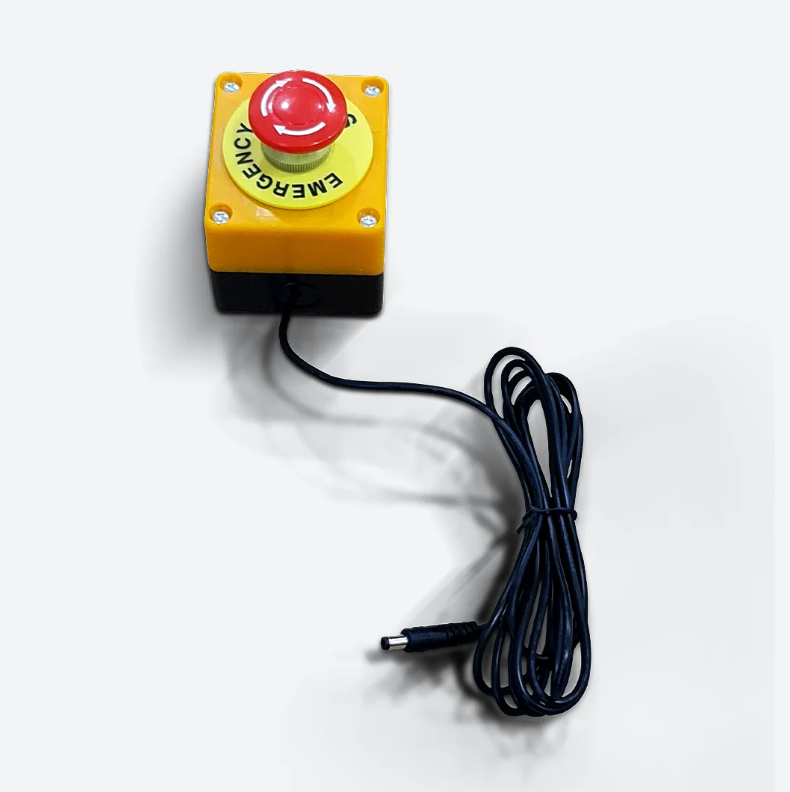
DOF Reality eBreak Stop Button for 6 DOF
Got Questions?
Email: support@simulatordirect.com
Phone: (714) 202-9416
Choose options
Fast & Free Shipping On Eligible Items
Exclusions Apply
Lowest Price Guarantee
Found a better price? We’ll match it — Guaranteed.
Simulator Expertise
Talk to a Real Expert
(714) 202-9416
Mon–Sat 8AM–5PM PST
- Description
- Product Features
- What's Included
- Product Specifications
- Product Installation Guide
- FAQ's
- Shipping/Returns & Warranty Policy
DOF Reality eBreak Stop Button for 6DOF Platforms
Quick-access emergency stop control for DOF Reality 6DOF motion simulator setups.
The DOF Reality eBreak Stop Button is an emergency stop accessory designed to give users a fast and convenient way to stop platform motion immediately when needed.
It can be placed on or near the motion platform within close reach, allowing the driver, pilot, operator, or supervisor to quickly stop motion during setup, testing, or active simulator use.
This accessory is especially useful for high-motion 6DOF systems, commercial simulator environments, training spaces, VR setups, and shared-use installations where fast motion interruption may be needed for safety or comfort.
Product Features
| Feature | Details |
|---|---|
| Emergency Stop Function | Allows the user or operator to stop platform motion immediately when needed. |
| Designed for 6DOF Platforms | Built as an emergency stop accessory for DOF Reality 6DOF motion simulator systems. |
| Close-Reach Placement | Can be positioned on or near the platform so it remains accessible during simulator use. |
| Useful for Testing & Setup | Helpful during calibration, motion profile tuning, first-time setup, troubleshooting, and user training. |
| Good for Shared-Use Environments | A practical safety accessory for sim centers, training facilities, event setups, and multi-user simulator installations. |
What's Included
| Item | Description |
|---|---|
| DOF Reality eBreak Stop Button | Emergency stop button accessory for stopping platform motion quickly. |
Not Included: Motion platform, seat, simulator controls, PC, displays, VR headset, and other simulator accessories are sold separately unless included in a separate bundle.
Product Specifications
| Specification | Details |
|---|---|
| Product Type | Emergency stop button / eBreak accessory |
| Primary Use | Stops platform motion immediately when activated |
| Designed For | DOF Reality 6DOF motion simulator platforms |
| Placement | Can be placed on or near the platform within close reach |
| Compatibility | Compatible with DOF Reality platform models |
Setup & Installation Recommendations
- Place the eBreak Stop Button where the user or operator can reach it quickly during simulator use.
- Keep the button clear of loose cables, moving parts, and areas where it could be accidentally blocked.
- Test the stop function during initial setup before running full-intensity motion profiles.
- For commercial or shared-use setups, make sure users and staff know where the stop button is located before each session.
- Re-check placement after changing seat position, cockpit accessories, or simulator layout.
Frequently Asked Questions
Q. What does the eBreak Stop Button do? Click to expand ▼
A. The eBreak Stop Button allows you to stop platform motion immediately when needed. It is designed as a quick-access motion stop accessory for DOF Reality simulator platforms.
Q. Is this for 6DOF platforms only? Click to expand ▼
A. This version is intended for 6DOF setups, but the eBreak Stop Button is compatible with DOF Reality platform models. If you are unsure which version is best for your setup, contact us before ordering.
Q. Where should I place the stop button? Click to expand ▼
A. Place it on or near the platform within easy reach of the user or operator. The goal is to make sure it can be accessed quickly without stretching or moving into an unsafe position.
Q. Is this useful for commercial simulator setups? Click to expand ▼
A. Yes. It is a practical accessory for sim centers, training facilities, event setups, VR arcades, and other shared-use environments where quick motion interruption may be needed.
Q. Should I test the stop button after installation? Click to expand ▼
A. Yes. Test the stop function during setup and before running full-intensity motion profiles so you know it is accessible and functioning as expected.
Q. Is the motion platform included? Click to expand ▼
A. No. This product is the eBreak Stop Button accessory only. Motion platforms and other simulator hardware are sold separately unless included in a specific bundle.
Shipping/Returns & Warranty Policy
1. General Terms of Sale
All purchases made through Simulator Direct for DOF Reality products are governed by DOF Reality’s official Terms of Trade. Each product is sold new and compliant with all relevant international manufacturing and consumer laws.
Changes or special arrangements must be confirmed in writing prior to purchase.
2. Pricing and Payments
- USD Pricing: All prices are shown in USD and exclude local VAT, import duties, customs fees, or brokerage costs.
- Customer Responsibility: Customers are responsible for paying all applicable local taxes and import charges upon delivery.
- Custom or Professional Systems: Payment for custom-built or professional systems requires an upfront deposit before production begins.
- Payment Window: Orders not paid within 5 business days will be placed on hold and cancelled after an additional 2 days if payment is not received.
- Discounts: Only one discount or promotion code may be applied per order. Discounts cannot be combined or applied retroactively.
- Currency Conversion: Currency conversions displayed in local values are estimates only. Final pricing is determined by your bank’s exchange rate at the time of transaction.
3. Shipping Policy
Shipping Methods
- All platforms and accessories are shipped in securely packed boxes via international freight.
- Each system is assembled, tested, and calibrated before shipping, then disassembled for safe transport.
- Customers will receive detailed assembly instructions and all tools required for setup.
Delivery Terms
- DAP Incoterms: Orders ship under DAP Incoterms, meaning Delivered at Place.
- You are responsible for import customs clearance and any local duties or taxes that may be charged by your country.
- In many cases, shipments to North America clear without additional import fees, but customs duties, tariffs, and taxes are ultimately determined by local authorities and are outside our control.
- Ships From Poland: DOF Reality motion simulators are built and shipped directly from DOF Reality in Poland.
- Production Batches: DOF Reality products ship in production batches approximately every 2–3 weeks. Delivery timing depends on when your order enters the next production batch.
- Estimated Delivery Timeframe: Most DOF Reality orders are delivered within approximately 5–6 weeks from the date of purchase. This estimate includes payment processing, production, customs export/import, and transit time to your address.
- Payment processing may take approximately 5–7 business days.
- Delivery times may vary based on freight carrier schedules, customs processing, and regional conditions.
- Pre-Orders: Pre-orders may have undefined shipping dates until production begins. Once your order enters the production queue, we will provide an updated estimated delivery timeframe.
Shipping Cost Adjustments
- Shipping rates listed on the website are estimates and may fluctuate based on destination or carrier rate changes.
- If additional freight charges apply, customers will be notified prior to shipment for approval or refund.
Inspection Upon Delivery
Customers must inspect all packages immediately upon delivery.
Any missing or damaged items must be reported in writing within 48 hours. Failure to do so may void any replacement claim.
4. Returns and Refunds
Eligibility
- Refunds are only granted if a product is defective and cannot be restored to working condition through joint support between DOF Reality and the customer.
- Refunds will not be issued for change of mind or buyer’s remorse.
- Shipping and return shipping costs are the responsibility of the customer.
- Products must be properly packaged for return to prevent damage in transit.
- Refunds, if approved, will be processed within 20 business days after the returned product is received and inspected.
- High-value orders are processed shortly after purchase. Cancellations must be requested promptly to avoid processing fees.
Pre-Order and Custom Orders
- All pre-order deposits are non-refundable.
- Custom-built units cannot be cancelled or refunded once production has begun.
5. Warranty Policy
Coverage Period
All DOF Reality systems come with a 12-month limited warranty covering defects in materials or workmanship from the date of delivery.
Replacement or repaired components receive a 6-month warranty from their installation date.
Consumer Models: M & H Series
- Warranty applies to private, non-commercial use only.
- Commercial use voids the warranty coverage.
- Coverage excludes wear items such as motors, wheels, dampers, or mechanical joints that are subject to normal wear and tear.
Professional Models
- Professional and commercial-grade systems include a 12-month limited warranty with similar exclusions.
- On-site service may be offered at DOF Reality’s discretion for professional setups.
Warranty Limitations
Warranty does not cover:
- Normal wear and tear of moving components
- Improper storage, installation, or use against the manufacturer’s recommendations
- Unauthorized repairs or modifications
- Over-tightening dampers or overheating motors above 70°C
- Software-related issues or third-party system conflicts
Slight play in gearboxes, up to 10% of motion range, is normal and not considered a defect.
Claim Procedure
- Report any issue in writing immediately upon discovery.
- Provide photos, video, or diagnostic details as requested.
- Simulator Direct/DOF Reality will evaluate the claim within a reasonable timeframe.
- If approved, defective parts will be repaired, replaced, or shipped to you for replacement.
- Customers are responsible for the cost and risk of returning defective parts.
If Simulator Direct/DOF Reality fails to resolve a covered issue within a reasonable time, the customer may request a cancellation and refund for that item.
6. Extended Warranty & Service Plans
Optional extended warranty and software/hardware support packages are available upon request for professional models only.
These plans are tailored to each installation and priced based on system specifications.
Contact support@simulatordirect.com for details.
7. Software License Terms
Each platform includes a Sim Racing Studio Standard License, which is sufficient for full motion operation.
Premium features are available through an optional paid Sim Racing Studio Premium subscription, purchased directly from Sim Racing Studio.
DOF Reality is not responsible for changes or telemetry issues in third-party software or games.
8. Liability Disclaimer
DOF Reality products are designed for private entertainment purposes only.
The company is not liable for:
- Personal injury, loss of income, or indirect damages
- Misuse, modification, or unintended operation of the product
- Software or hardware malfunctions caused by third-party equipment
Maximum liability shall not exceed 50% of the total amount invoiced to the customer in the previous year, or $25 USD, whichever is lower.
9. Governing Law
Orders placed through Simulator Direct are governed by the laws applicable to Simulator Direct and the customer’s transaction, unless otherwise required by law. Certain manufacturer warranty, support, or product terms may also be governed by the manufacturer’s own terms and conditions..
10. Contact Information
For warranty claims, returns, or technical support, please contact:
Simulator Direct
Email: support@simulatordirect.com

Newsletter
Exclusive Updates. Delivered Before Anyone Else.