
Skip to content

Cart

Your cart is empty

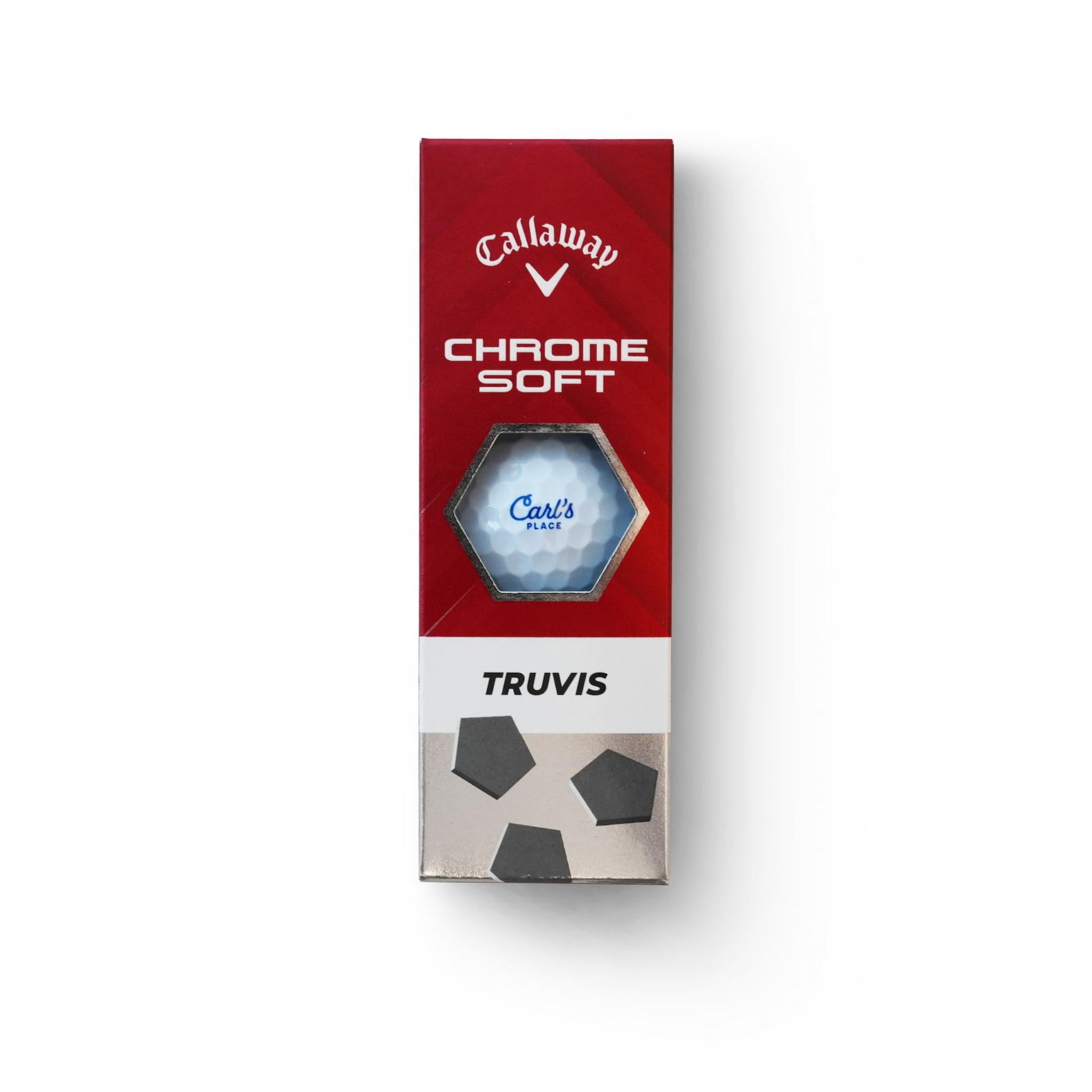
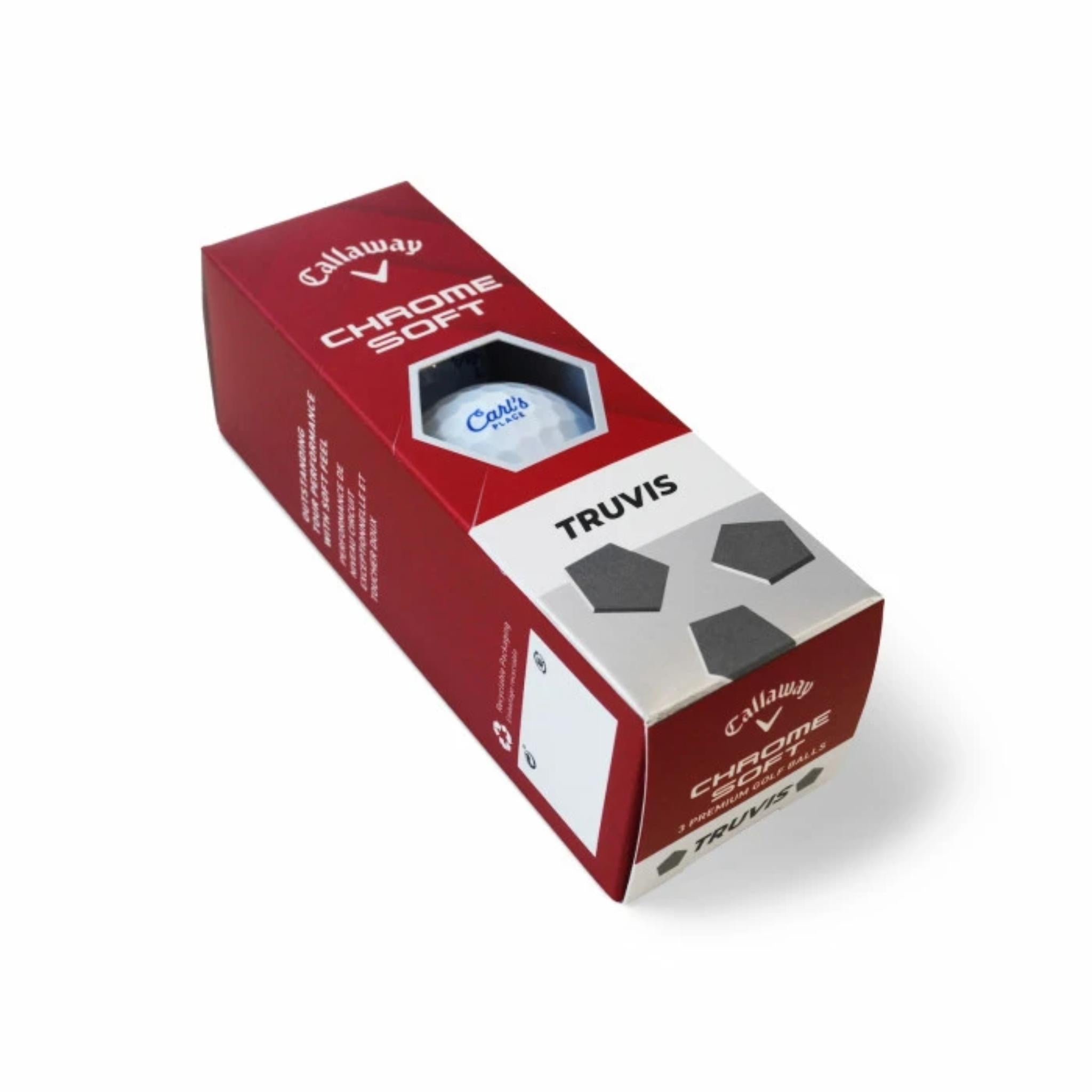
Carl's Place Callaway Chrome Soft Golf Balls, Sleeve

Sale price$15.99

Got Questions?
Email: support@simulatordirect.com
Phone: (714) 202-9416

  • American Express
  • Apple Pay
  • Diners Club
  • Discover
  • Google Pay
  • Mastercard
  • PayPal
  • Shop Pay
  • Visa

Fast & Free Shipping On Eligible Items

Exclusions Apply

Lowest Price Guarantee

Found a better price? We’ll match it — Guaranteed.

Simulator Expertise

Talk to a Real Expert
(714) 202-9416
Mon–Sat 8AM–5PM PST

Description

Carl’s Place Golf Balls

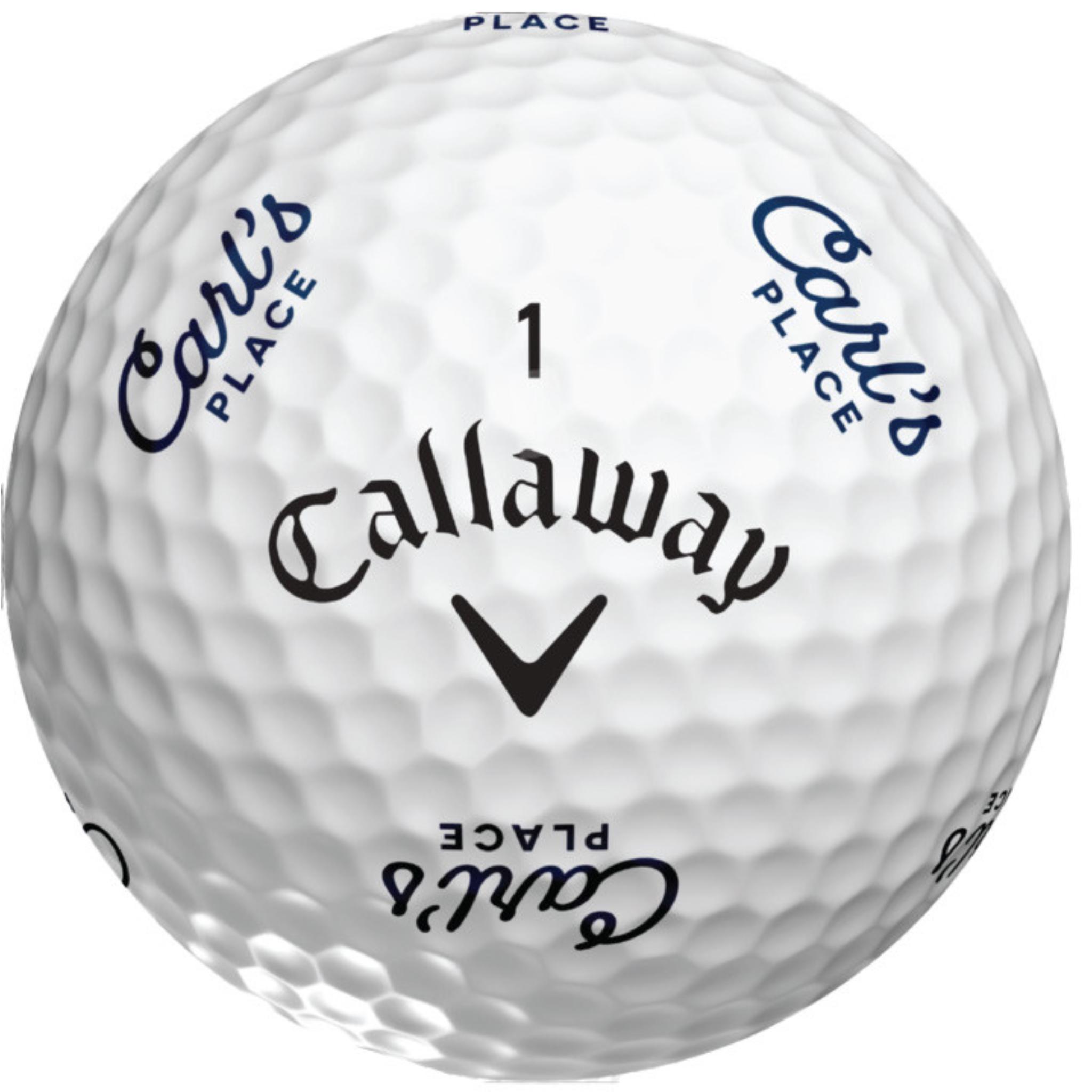
Bring precision and style to your simulator or course play with Carl’s Place Golf Balls, featuring Callaway’s Chrome Soft Truvis design customized with the iconic Carl’s Place logo.

Carl’s Place Callaway Chrome Soft Truvis Golf Balls

These balls combine elite performance with a bold, custom-branded look. They deliver dependable distance, spin control, and soft feel while standing out whether you are practicing indoors or playing on a real course.

These golf balls are not marked for launch monitor-specific tracking, so they are best suited for devices that do not require dot-patterned or stripe-patterned balls.


Product Features

Product Features

Premium Performance with Custom Branding

  • Premium Callaway Performance: Built on Callaway’s Chrome Soft Truvis design for balanced distance, feel, and spin.
    • Great for full-swing practice.
    • Designed to provide a soft feel while still supporting strong distance performance.
  • Custom Carl’s Place Logo: Features distinct Carl’s Place branding.
    • Adds a unique look to your simulator setup or golf bag.
    • Easy to distinguish from standard golf balls during practice.
  • Versatile Use: Designed for both indoor simulator practice and real-course play.
    • Useful for customers who want one ball style for practice and play.
    • Works well in simulator spaces that do not require marked tracking balls.
  • Control and Spin: Multi-layer construction supports greenside control while maintaining speed off the tee.
    • Helpful for short-game practice.
    • Provides a softer response compared to firmer distance-focused balls.
  • Flexible Quantity Options: Available by the sleeve or in larger pack quantities.
    • Choose a sleeve if you want to test them first.
    • Choose a larger pack if you practice frequently or want extras on hand.

Launch Monitor Note: These balls are not dot-marked or stripe-marked for launch monitors that require specialty tracking balls. Please confirm your launch monitor’s ball requirements before ordering.


Product Specifications

Product Specifications

Specification Details
Product Carl’s Place Golf Balls
Model Callaway Chrome Soft Truvis
Customization Carl’s Place logo printed on the ball
Construction Multi-piece construction designed for soft feel and performance
Design Truvis visual pattern
Tracking Marks Not dot-marked or stripe-marked for launch monitor-specific tracking
Quantity Options Available by sleeve or larger pack quantities depending on selected option
Recommended Use Simulator practice, training sessions, and real-course play where marked balls are not required

What's Included

What's Included

  • Carl’s Place Callaway Chrome Soft Truvis Golf Balls
    • Quantity depends on the option selected before checkout.
    • Available as a 3-ball sleeve or larger pack quantity depending on product configuration.

Not Included: Golf simulator, launch monitor, hitting mat, enclosure, and accessories are sold separately unless specifically included with your selected product configuration.


Getting Started Guide

Getting Started Guide

  1. Step 1: Choose Your Quantity
    • Select a sleeve if you want to try them first.
    • Select a larger pack if you practice often or want extras for course play.
  2. Step 2: Confirm Launch Monitor Requirements
    • Use these balls with launch monitors that do not require special marked balls.
    • If your launch monitor requires dots, stripes, or other markings, these may not be the correct option.
  3. Step 3: Keep Balls Clean
    • Clean golf balls help maintain consistent flight and reduce marks on impact screens.
  4. Step 4: Practice or Play
    • Use them indoors for simulator practice or outdoors on the golf course.
  5. Step 5: Inspect After Use
    • Check for scuffs, cuts, or damage after repeated use.
    • Rotate balls during practice to extend their usable life.

Product Installation Guide

Use & Care Recommendations

  • Store Properly: Keep the balls in a cool, dry place.
    • A golf bag, ball tray, or storage bin works well.
    • Avoid extreme heat or direct sunlight for long periods.
  • Use Clean Balls with Impact Screens: Wipe balls regularly before simulator use.
    • Dirt and debris can transfer marks onto the screen surface.
    • This is especially helpful if using a ball return system.
  • Check Your Hitting Surface: Confirm your hitting mat or turf is in good condition.
    • Worn turf can increase scuffing on the golf ball cover.
  • Rotate During Practice: Use multiple balls during frequent simulator sessions.
    • This helps spread wear across multiple balls instead of overusing one ball.

FAQ's

Frequently Asked Questions

Q. Can I use these balls with my launch monitor? Click to expand ▼

A. These Carl’s Place Chrome Soft Truvis balls are not dot-marked or stripe-marked, so they may not work with launch monitors that require specialty marked balls for tracking. Please confirm your launch monitor’s requirements before ordering.

Q. Are these just for simulators or also for real golf? Click to expand ▼

A. They can be used for both simulator practice and real-course play, as long as your simulator launch monitor does not require specially marked balls.

Q. Why choose a sleeve instead of a dozen? Click to expand ▼

A. A 3-ball sleeve is a cost-effective way to test the feel and performance before purchasing a larger quantity.

Q. Do these perform like standard Chrome Soft Truvis balls? Click to expand ▼

A. Yes. The Carl’s Place logo is a visual customization and does not change the ball’s normal playing characteristics.

Q. Can these golf balls mark my impact screen? Click to expand ▼

A. Any golf ball can transfer dirt or marks if it is dirty, scuffed, or damaged. For best results, use clean golf balls and inspect them regularly before simulator use.

Shipping/Returns & Warranty Policy

Shipping, Returns & Warranty Policy

This policy explains how Simulator Direct handles shipping, freight delivery, returns, cancellations, warranty-related concerns, and replacement part requests for Carl’s Place products sold through Simulator Direct.


Important: Many Carl’s Place products are made-to-order, custom-sized, or considered wearable items due to their intended use in golf simulator environments. Please review this policy carefully before placing an order.

Shipping Policy

Simulator Direct processes and ships orders using trusted carriers to ensure reliable delivery and product protection. Orders are typically fulfilled through FedEx or UPS, with freight delivery arranged for oversized products such as full simulator enclosures, pipe framing kits, and large built-in components.


Lead Time & Processing

  • Orders are generally processed within 5–7 business days, depending on product type, supplier lead times, order volume, and customization requirements.
    • Made-to-order products may require additional production time.
    • Estimated delivery dates are provided in good faith and may vary based on carrier schedules or supplier production timelines.
  • Transit time typically ranges from 3–7 business days after shipment.
    • Delivery time may vary depending on destination, carrier capacity, weather, holidays, or freight scheduling.
    • Tracking details will be provided by email once your order has shipped.

Freight Deliveries & Lift Gate Service

Larger items such as pipe framing kits, built-in panels, and other oversized simulator components may ship via freight carrier. Freight shipments may arrive on pallets or in multiple heavy boxes depending on the product ordered.

  • For non-residential deliveries without a loading dock, we strongly recommend selecting Lift Gate Service.
    • Lift Gate Service allows the freight driver to safely lower your shipment to the ground using a hydraulic platform.
    • This is especially useful for heavy enclosure frames, pre-cut pipe kits, built-in panels, or palletized shipments.
  • Typical lift gate capacity accommodates loads up to approximately 1,000 lbs.
    • Customers should still be prepared to move the shipment from the drop-off location once delivered.
  • Lift Gate Service of $185 will be automatically included in the price for any freight deliveries shipped as Residential.
    • For residential freight deliveries, lift gate service is already built into the residential freight option.
  • Fees for non-residential lift gate service, where a loading dock is otherwise required, shall have a flat rate of $185 and may be offered as a product add-on option for customers who require it.
    • If a business location does not have a loading dock or forklift, Lift Gate Service is strongly recommended.

Freight Handling Information for Curved Golf Simulator Enclosure Kits

Carl's Place golf simulator Pipe Framing Kits and Back Cover Pipe Kits are custom-fabricated components that ship directly from the manufacturing partner. Due to their size and weight, each kit requires special packaging and insured freight delivery. A flat Freight Handling Fee applies to cover professional packaging, carrier logistics, and safe arrival.

Freight Item Freight Handling Fee
Pipe Framing Kit $700 Freight Handling Fee
Back Cover Pipe Kit $700 Freight Handling Fee
Bundle Both $700 Combined Freight Handling Fee

Rates are averaged nationally to account for regional carrier costs and state taxes.


Shipping Responsibilities

  • Customers are responsible for shipping costs on all orders unless otherwise stated.
    • Shipping charges may vary based on product size, weight, destination, and delivery method.
  • International shipments do not include customs duties, brokerage fees, import taxes, or other import-related costs.
    • These charges are the responsibility of the recipient.
    • International freight shipments may require a broker depending on the destination country.
  • Please inspect all deliveries upon arrival to ensure all boxes and components are received in good condition.
    • If any item arrives damaged or missing, contact support@simulatordirect.com as soon as possible with photos, tracking details, and your order number.

Return Policy

We want you to be satisfied with your purchase. However, due to the custom nature of many products listed for resale, certain return restrictions apply.


Return Eligibility

  • Returns must be requested within 14 days of receiving your order.
    • Requests submitted after the return window may not be eligible for approval.
  • All items must be unused, in original packaging, and in resalable condition.
    • Items that show signs of use, installation, damage, wear, or missing packaging may be refused or subject to additional fees.
  • Return shipping costs are the responsibility of the customer.
    • Original shipping costs are generally non-refundable unless the return is due to an approved shipping or fulfillment error.
  • High-value orders are processed shortly after purchase.
    • Cancellations must be requested promptly to avoid production, processing, cancellation, or restocking fees.

Restocking Fees & Non-Returnable Items

  • Products with custom sizing or configurations may incur a restocking fee of up to 30%.
    • This may apply to custom impact screens, custom enclosures, and made-to-order products.
  • Items incorporating special finishes, unique finishing styles, or non-standard dimensions may not be eligible for return.
    • Because these items are made specifically for the customer, they may not be resalable once produced.
  • Wearable items, such as golf impact screens, are non-returnable once used.
    • Natural wear may occur immediately after golf ball impact use.
    • Visible marks, scuffs, or wear from normal use are not considered returnable defects.
  • Partial kit returns are not accepted.
    • All components must be returned together in the original packaging and condition.

Return Process

  1. Contact support@simulatordirect.com to initiate your return request.
    • Please include your order number and the reason for the return.
  2. Include photos if applicable.
    • Photos may be required for damaged items, shipping concerns, incorrect items, or product condition review.
  3. Once approved, you will receive return authorization and shipping instructions.
    • Do not ship items back without return authorization.
  4. Refunds are issued to the original payment method within 7–10 business days of receiving and inspecting the return.
    • Refund timing may vary depending on your bank, credit card provider, or payment processor.

Order Changes & Cancellations

If you need to change or cancel your order, please contact support@simulatordirect.com as soon as possible.

  • Orders with custom dimensions are subject to a 30% cancellation fee if changed after 24 hours.
    • Custom products may enter production shortly after order placement.
  • Orders that include manufacturer-direct products may incur a 5% cancellation fee.
    • This may apply when the supplier has already begun processing, preparing, or fulfilling the order.
  • Cancellations are not guaranteed after shipment.
    • If the order has already shipped, it will follow the standard return policy if eligible.

Warranty & Replacements

Carl's Place products are designed for long-term use but are considered wearable items due to their nature and purpose. Therefore, they are not covered under a traditional manufacturer warranty. Some visible wear may occur after the first use and is considered normal.

If you experience damage upon arrival or have performance concerns, please contact our support team with photos and your order number for assistance.


Replacement Parts

  • Most components, including enclosure panels and screens, can be replaced individually.
    • Replacement availability may vary depending on product type, age, model, and supplier availability.
  • To request a replacement part, email support@simulatordirect.com with your order details and the specific item required.
    • Please include photos if the replacement request is related to damage, fitment, or performance concerns.

Description

Carl’s Place Golf Balls

Bring precision and style to your simulator or course play with Carl’s Place Golf Balls, featuring Callaway’s Chrome Soft Truvis design customized with the iconic Carl’s Place logo.

Carl’s Place Callaway Chrome Soft Truvis Golf Balls

These balls combine elite performance with a bold, custom-branded look. They deliver dependable distance, spin control, and soft feel while standing out whether you are practicing indoors or playing on a real course.

These golf balls are not marked for launch monitor-specific tracking, so they are best suited for devices that do not require dot-patterned or stripe-patterned balls.


Product Features

Product Features

Premium Performance with Custom Branding

  • Premium Callaway Performance: Built on Callaway’s Chrome Soft Truvis design for balanced distance, feel, and spin.
    • Great for full-swing practice.
    • Designed to provide a soft feel while still supporting strong distance performance.
  • Custom Carl’s Place Logo: Features distinct Carl’s Place branding.
    • Adds a unique look to your simulator setup or golf bag.
    • Easy to distinguish from standard golf balls during practice.
  • Versatile Use: Designed for both indoor simulator practice and real-course play.
    • Useful for customers who want one ball style for practice and play.
    • Works well in simulator spaces that do not require marked tracking balls.
  • Control and Spin: Multi-layer construction supports greenside control while maintaining speed off the tee.
    • Helpful for short-game practice.
    • Provides a softer response compared to firmer distance-focused balls.
  • Flexible Quantity Options: Available by the sleeve or in larger pack quantities.
    • Choose a sleeve if you want to test them first.
    • Choose a larger pack if you practice frequently or want extras on hand.

Launch Monitor Note: These balls are not dot-marked or stripe-marked for launch monitors that require specialty tracking balls. Please confirm your launch monitor’s ball requirements before ordering.


Product Specifications

Product Specifications

Specification Details
Product Carl’s Place Golf Balls
Model Callaway Chrome Soft Truvis
Customization Carl’s Place logo printed on the ball
Construction Multi-piece construction designed for soft feel and performance
Design Truvis visual pattern
Tracking Marks Not dot-marked or stripe-marked for launch monitor-specific tracking
Quantity Options Available by sleeve or larger pack quantities depending on selected option
Recommended Use Simulator practice, training sessions, and real-course play where marked balls are not required

What's Included

What's Included

  • Carl’s Place Callaway Chrome Soft Truvis Golf Balls
    • Quantity depends on the option selected before checkout.
    • Available as a 3-ball sleeve or larger pack quantity depending on product configuration.

Not Included: Golf simulator, launch monitor, hitting mat, enclosure, and accessories are sold separately unless specifically included with your selected product configuration.


Getting Started Guide

Getting Started Guide

  1. Step 1: Choose Your Quantity
    • Select a sleeve if you want to try them first.
    • Select a larger pack if you practice often or want extras for course play.
  2. Step 2: Confirm Launch Monitor Requirements
    • Use these balls with launch monitors that do not require special marked balls.
    • If your launch monitor requires dots, stripes, or other markings, these may not be the correct option.
  3. Step 3: Keep Balls Clean
    • Clean golf balls help maintain consistent flight and reduce marks on impact screens.
  4. Step 4: Practice or Play
    • Use them indoors for simulator practice or outdoors on the golf course.
  5. Step 5: Inspect After Use
    • Check for scuffs, cuts, or damage after repeated use.
    • Rotate balls during practice to extend their usable life.

Product Installation Guide

Use & Care Recommendations

  • Store Properly: Keep the balls in a cool, dry place.
    • A golf bag, ball tray, or storage bin works well.
    • Avoid extreme heat or direct sunlight for long periods.
  • Use Clean Balls with Impact Screens: Wipe balls regularly before simulator use.
    • Dirt and debris can transfer marks onto the screen surface.
    • This is especially helpful if using a ball return system.
  • Check Your Hitting Surface: Confirm your hitting mat or turf is in good condition.
    • Worn turf can increase scuffing on the golf ball cover.
  • Rotate During Practice: Use multiple balls during frequent simulator sessions.
    • This helps spread wear across multiple balls instead of overusing one ball.

FAQ's

Frequently Asked Questions

Q. Can I use these balls with my launch monitor? Click to expand ▼

A. These Carl’s Place Chrome Soft Truvis balls are not dot-marked or stripe-marked, so they may not work with launch monitors that require specialty marked balls for tracking. Please confirm your launch monitor’s requirements before ordering.

Q. Are these just for simulators or also for real golf? Click to expand ▼

A. They can be used for both simulator practice and real-course play, as long as your simulator launch monitor does not require specially marked balls.

Q. Why choose a sleeve instead of a dozen? Click to expand ▼

A. A 3-ball sleeve is a cost-effective way to test the feel and performance before purchasing a larger quantity.

Q. Do these perform like standard Chrome Soft Truvis balls? Click to expand ▼

A. Yes. The Carl’s Place logo is a visual customization and does not change the ball’s normal playing characteristics.

Q. Can these golf balls mark my impact screen? Click to expand ▼

A. Any golf ball can transfer dirt or marks if it is dirty, scuffed, or damaged. For best results, use clean golf balls and inspect them regularly before simulator use.

Shipping/Returns & Warranty Policy

Shipping, Returns & Warranty Policy

This policy explains how Simulator Direct handles shipping, freight delivery, returns, cancellations, warranty-related concerns, and replacement part requests for Carl’s Place products sold through Simulator Direct.


Important: Many Carl’s Place products are made-to-order, custom-sized, or considered wearable items due to their intended use in golf simulator environments. Please review this policy carefully before placing an order.

Shipping Policy

Simulator Direct processes and ships orders using trusted carriers to ensure reliable delivery and product protection. Orders are typically fulfilled through FedEx or UPS, with freight delivery arranged for oversized products such as full simulator enclosures, pipe framing kits, and large built-in components.


Lead Time & Processing

  • Orders are generally processed within 5–7 business days, depending on product type, supplier lead times, order volume, and customization requirements.
    • Made-to-order products may require additional production time.
    • Estimated delivery dates are provided in good faith and may vary based on carrier schedules or supplier production timelines.
  • Transit time typically ranges from 3–7 business days after shipment.
    • Delivery time may vary depending on destination, carrier capacity, weather, holidays, or freight scheduling.
    • Tracking details will be provided by email once your order has shipped.

Freight Deliveries & Lift Gate Service

Larger items such as pipe framing kits, built-in panels, and other oversized simulator components may ship via freight carrier. Freight shipments may arrive on pallets or in multiple heavy boxes depending on the product ordered.

  • For non-residential deliveries without a loading dock, we strongly recommend selecting Lift Gate Service.
    • Lift Gate Service allows the freight driver to safely lower your shipment to the ground using a hydraulic platform.
    • This is especially useful for heavy enclosure frames, pre-cut pipe kits, built-in panels, or palletized shipments.
  • Typical lift gate capacity accommodates loads up to approximately 1,000 lbs.
    • Customers should still be prepared to move the shipment from the drop-off location once delivered.
  • Lift Gate Service of $185 will be automatically included in the price for any freight deliveries shipped as Residential.
    • For residential freight deliveries, lift gate service is already built into the residential freight option.
  • Fees for non-residential lift gate service, where a loading dock is otherwise required, shall have a flat rate of $185 and may be offered as a product add-on option for customers who require it.
    • If a business location does not have a loading dock or forklift, Lift Gate Service is strongly recommended.

Freight Handling Information for Curved Golf Simulator Enclosure Kits

Carl's Place golf simulator Pipe Framing Kits and Back Cover Pipe Kits are custom-fabricated components that ship directly from the manufacturing partner. Due to their size and weight, each kit requires special packaging and insured freight delivery. A flat Freight Handling Fee applies to cover professional packaging, carrier logistics, and safe arrival.

Freight Item Freight Handling Fee
Pipe Framing Kit $700 Freight Handling Fee
Back Cover Pipe Kit $700 Freight Handling Fee
Bundle Both $700 Combined Freight Handling Fee

Rates are averaged nationally to account for regional carrier costs and state taxes.


Shipping Responsibilities

  • Customers are responsible for shipping costs on all orders unless otherwise stated.
    • Shipping charges may vary based on product size, weight, destination, and delivery method.
  • International shipments do not include customs duties, brokerage fees, import taxes, or other import-related costs.
    • These charges are the responsibility of the recipient.
    • International freight shipments may require a broker depending on the destination country.
  • Please inspect all deliveries upon arrival to ensure all boxes and components are received in good condition.
    • If any item arrives damaged or missing, contact support@simulatordirect.com as soon as possible with photos, tracking details, and your order number.

Return Policy

We want you to be satisfied with your purchase. However, due to the custom nature of many products listed for resale, certain return restrictions apply.


Return Eligibility

  • Returns must be requested within 14 days of receiving your order.
    • Requests submitted after the return window may not be eligible for approval.
  • All items must be unused, in original packaging, and in resalable condition.
    • Items that show signs of use, installation, damage, wear, or missing packaging may be refused or subject to additional fees.
  • Return shipping costs are the responsibility of the customer.
    • Original shipping costs are generally non-refundable unless the return is due to an approved shipping or fulfillment error.
  • High-value orders are processed shortly after purchase.
    • Cancellations must be requested promptly to avoid production, processing, cancellation, or restocking fees.

Restocking Fees & Non-Returnable Items

  • Products with custom sizing or configurations may incur a restocking fee of up to 30%.
    • This may apply to custom impact screens, custom enclosures, and made-to-order products.
  • Items incorporating special finishes, unique finishing styles, or non-standard dimensions may not be eligible for return.
    • Because these items are made specifically for the customer, they may not be resalable once produced.
  • Wearable items, such as golf impact screens, are non-returnable once used.
    • Natural wear may occur immediately after golf ball impact use.
    • Visible marks, scuffs, or wear from normal use are not considered returnable defects.
  • Partial kit returns are not accepted.
    • All components must be returned together in the original packaging and condition.

Return Process

  1. Contact support@simulatordirect.com to initiate your return request.
    • Please include your order number and the reason for the return.
  2. Include photos if applicable.
    • Photos may be required for damaged items, shipping concerns, incorrect items, or product condition review.
  3. Once approved, you will receive return authorization and shipping instructions.
    • Do not ship items back without return authorization.
  4. Refunds are issued to the original payment method within 7–10 business days of receiving and inspecting the return.
    • Refund timing may vary depending on your bank, credit card provider, or payment processor.

Order Changes & Cancellations

If you need to change or cancel your order, please contact support@simulatordirect.com as soon as possible.

  • Orders with custom dimensions are subject to a 30% cancellation fee if changed after 24 hours.
    • Custom products may enter production shortly after order placement.
  • Orders that include manufacturer-direct products may incur a 5% cancellation fee.
    • This may apply when the supplier has already begun processing, preparing, or fulfilling the order.
  • Cancellations are not guaranteed after shipment.
    • If the order has already shipped, it will follow the standard return policy if eligible.

Warranty & Replacements

Carl's Place products are designed for long-term use but are considered wearable items due to their nature and purpose. Therefore, they are not covered under a traditional manufacturer warranty. Some visible wear may occur after the first use and is considered normal.

If you experience damage upon arrival or have performance concerns, please contact our support team with photos and your order number for assistance.


Replacement Parts

  • Most components, including enclosure panels and screens, can be replaced individually.
    • Replacement availability may vary depending on product type, age, model, and supplier availability.
  • To request a replacement part, email support@simulatordirect.com with your order details and the specific item required.
    • Please include photos if the replacement request is related to damage, fitment, or performance concerns.